
Replacing an Antenna Reader Terminal with an iTRT or iTRT2 in AmanoNet
Upgrading older Antenna Reader Terminals to an iTRT or iTRT2 can improve long-term reliability, compatibility, and supportability within an AmanoNet access control environment. This guide walks through the replacement process and explains how to correctly identify and assign the new hardware inside AmanoNet.
Before starting, ensure the new hardware has already been physically installed and properly wired. When replacing an Antenna Reader Terminal with an iTRT or iTRT2, the reader itself must also be replaced.
Before You Begin
Before making software changes:
- Confirm the iTRT or iTRT2 hardware is installed
- Verify power and communication wiring
- Replace the existing reader with a compatible reader
- Ensure you have access to the AmanoNet server and software
The iTRT2 platform supports modern access control features including OSDP support, legacy Wiegand compatibility, offline validation, and expanded controller functionality. Before stating make sure your new hardware is installed.
Note: When replacing an Antenna reader terminal with an iTRT or iTRT2 you must replace the reader
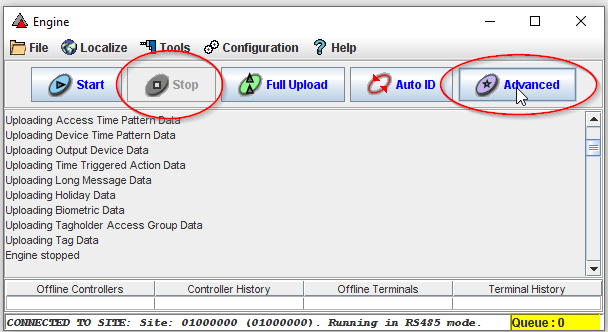
Step 1: Stop the Engine Service
Open Engine.exe and select:
- Stop
- Advanced
This allows AmanoNet to detect and reassign replacement hardware correctly.
Step 2: Identify the Existing Terminal
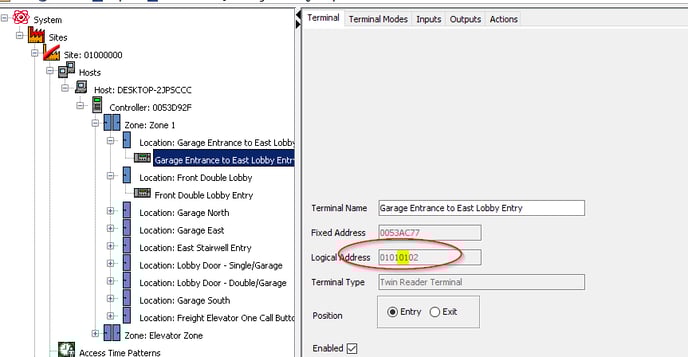
Locate the controller and terminal you are replacing:
- Open Access.exe
- Find the existing Reader Terminal
- Select the terminal
- Note the Logical Address shown in the configuration
This address will be used during the AutoID process.
Step 3: Start AutoID
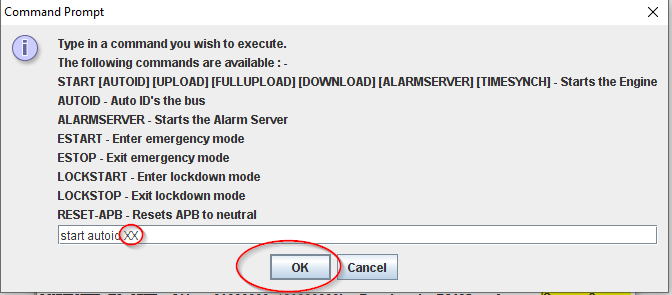
Using the command field, enter:
START AUTOID 01Replace 01 with the Logical Address of your controller. See Step 2 above.
Press Enter to begin the AutoID process.
Step 4: Refresh Access.exe
To display newly detected hardware:
- Close Access.exe
- Reopen the application
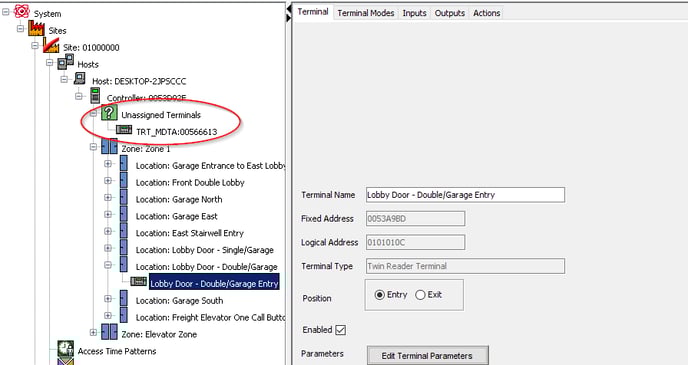
The replacement iTRT or iTRT2 should now appear under Unassigned Terminals.
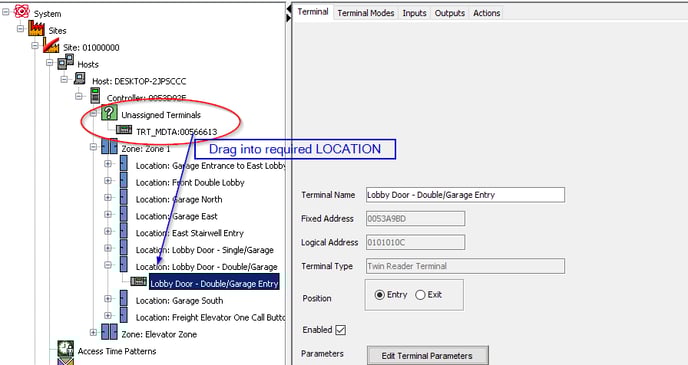
Step 5: Assign the New Terminal
Drag and drop the unassigned terminal into the correct location within the system tree.
Once assigned, verify:
- Event reporting
- Reader communication
- Credential reads
- Door operation
Important Notes
- Replacing an Antenna Reader Terminal requires replacing the connected reader hardware as well.
- Legacy Antenna Readers have cable distance and interference limitations that should be reviewed during upgrades.
- iTRT2 controllers support both modern OSDP readers and legacy Wiegand readers for easier retrofit deployments.
- Always verify controller synchronization and device status after commissioning new hardware.
Why Upgrade to an iTRT or iTRT2?
Modern distributed controllers offer several advantages over legacy Antenna Reader Terminal hardware, including:
- Improved scalability
- Better diagnostics
- Enhanced communication options
- Support for modern credential technologies
- OSDP compatibility
- Remote firmware upgrades
- Expanded offline validation capabilities
The iTRT2 platform was designed to support both retrofit projects and new installations while maintaining compatibility with existing Impro and Amano ecosystems.
Need Assistance?
If you require help replacing legacy AmanoNet hardware, configuring AutoID, or troubleshooting reader communication issues, contact PMT Security support for assistance.