
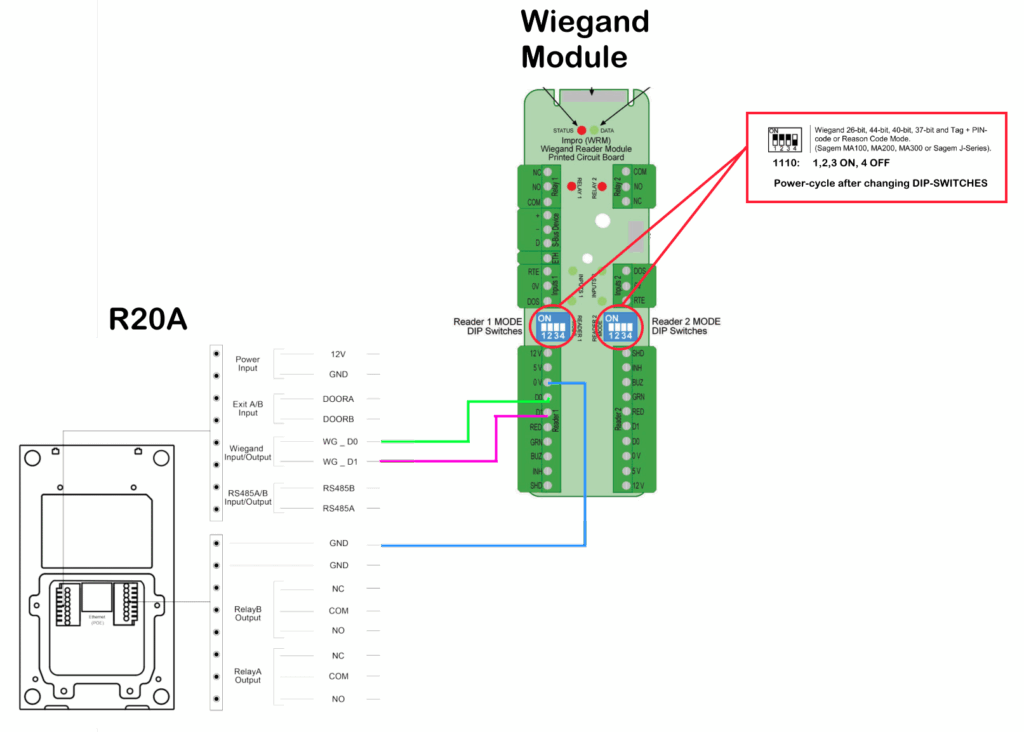
Akuvox R20 Wiring Diagram to Wiegand Reader Module
Integrating an Akuvox R20 with a Wiegand Reader Module (WRM) allows organizations to combine modern intercom functionality with existing access control infrastructure.
This type of integration is commonly used when an Akuvox intercom needs to communicate with a third-party access control platform or a Wiegand-based controller environment. Proper wiring and configuration are essential to ensure reliable credential transmission, door operation, and event handling.
This guide outlines the wiring considerations and integration concepts involved when connecting an Akuvox R20 series intercom to a Wiegand Reader Module.
Why Use Wiegand Integration?
Wiegand remains widely used in access control systems because of its compatibility with both legacy and modern hardware platforms.
Integrating the Akuvox R20 with a WRM can provide:
- Intercom and access control integration
- Credential transmission to third-party controllers
- Shared door control functionality
- Support for retrofit environments
- Simplified migration from older reader technologies
This series supports both Wiegand Input and Wiegand Output modes depending on deployment requirements.
Best Practices for Intercom and Access Control Integration
For reliable operation and easier troubleshooting:
- Label all wiring clearly
- Document Wiegand formats used
- Verify relay operation during commissioning
- Test credential reads before deployment
- Separate low-voltage communication from high-voltage cabling
- Maintain consistent grounding practices
Proper commissioning helps reduce intermittent communication and credential-related issues.
Compatibility Notes
Depending on the model variant, the Akuvox R20 series supports:
- Wiegand input/output
- RS485 communication
- SIP-based intercom functionality
- RF card reader integration
- Third-party access control integration
- Relay outputs for door control
Hardware capabilities may vary slightly between Akuvox R20 models.
In some deployments, Wiegand integration may operate alongside newer technologies such as OSDP or IP-based access control infrastructure.
Need further assistance? If you require assistance wiring an Akuvox R20 to a Wiegand Reader Module, configuring Wiegand formats, or integrating intercom systems with access control infrastructure, contact PMT Security for technical support.