
• Skip to primary navigation
  • Skip to main content
PMT Security Logo

PMT Security

Advanced Access Control

  • Home
  • About Us
    • Security and Trust
    • Our Partners
    • Our Integrators
  • Solutions
    • Education
    • Retirement & Healthcare
    • Manufacturing
    • Government Facilities
    • Residential
    • Retail Businesses
    • Campgrounds & Outdoor Resorts
  • Products
    • Access Control
      • Control Features
      • Reporting & Monitoring
      • Control Module
      • Digital IO Module
      • Reader Module
      • Readers
    • Video Management
    • Visitor Management
    • Intercom
    • Live Guard Video Monitoring
    • Housings & Pedestals
  • Support
    • Knowledgebase
    • Download Center
    • License Request
    • RMA Request Form
  • Blog
  • Contact Us

Video Surveillance & VMS

What GIS Means in Modern Security Systems — and How It’s Used in Cathexis

What GIS Means in Modern Security Systems — and How It’s Used in Cathexis

Geographic Information Systems (GIS) are often associated with urban planning, utilities, or environmental science—but they are becoming increasingly relevant in physical security. As surveillance systems expand across multiple buildings, campuses, and regions, the ability to visualize security data spatially is no longer a luxury—it’s a practical necessity.

This is where GIS moves from theory into day-to-day operations.

What Is GIS (Geographic Information Systems)?

Wide At its core, GIS is a framework for capturing, managing, and visualizing data that is tied to a physical location.

Instead of looking at information as isolated data points—logs, alerts, camera feeds—GIS places that data onto a map or spatial layout. This allows users to understand not just what is happening, but where it’s happening, and how different events relate to one another geographically.

A GIS platform typically combines:

  • Spatial data (coordinates, maps, floorplans, site layouts)
  • Attribute data (events, alarms, device status, metadata)
  • Visualization tools (interactive maps, overlays, layers)

In a security context, that means turning raw system activity into a visual environment where movement, incidents, and system states can be interpreted in real time.

Why GIS Matters in Physical Security

CathexisVision, an open-platform video management system used in many integrated security environments, incorporates GIS functionality to bridge the gap between video data and spatial context.

Within CathexisVision, GIS is not treated as a separate module—it’s embedded into how operators interact with the system.

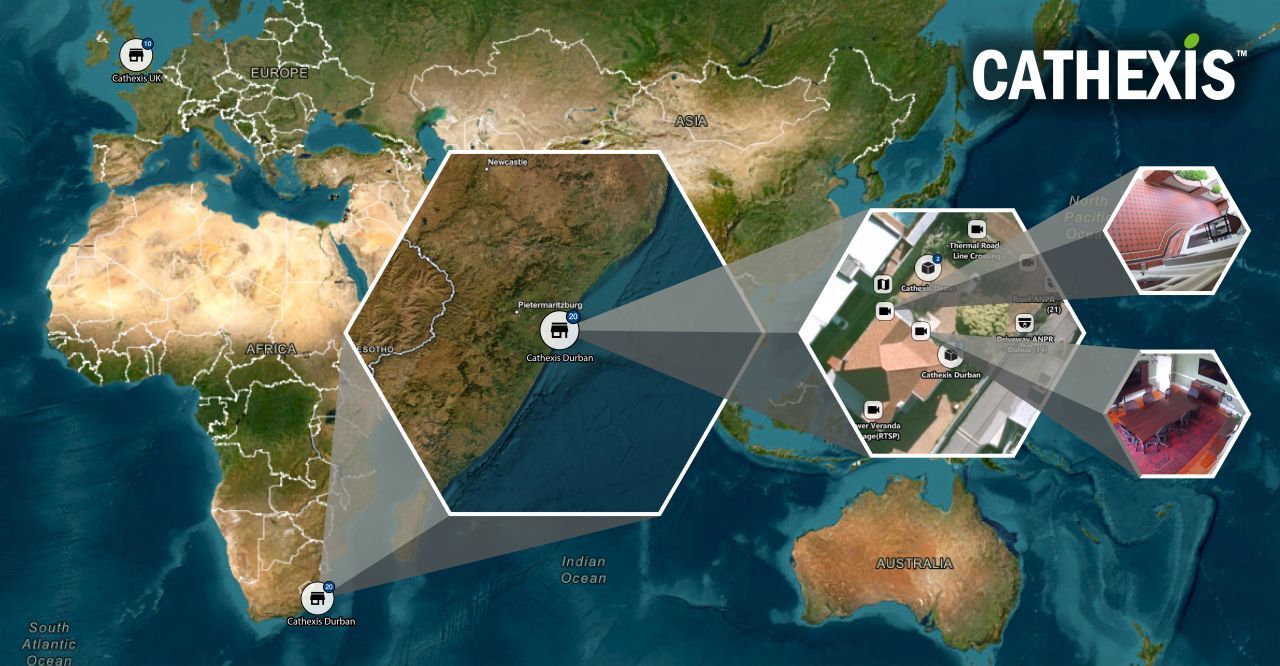
Map-Based Camera Visualization

Cameras are placed directly onto digital maps or site layouts. This can include:

  • Building floorplans
  • Campus maps
  • City or regional maps for distributed systems

Operators can click on a camera icon within the map and immediately access live or recorded video, eliminating the need to search through lists or naming conventions.

Layered System Awareness

GIS allows multiple layers of information to be displayed simultaneously, such as:

  • Camera locations
  • Access control points
  • Alarm zones
  • Perimeter boundaries

This layered approach aligns with how integrated systems are designed—where video, access control, and analytics all contribute to a single operational picture.

Event Visualization in Real Time

When an event occurs—motion detection, analytics trigger, or alarm—it can be represented visually on the map.

Instead of reading an alert and then locating the camera, operators see the event appear exactly where it’s happening. This reduces response friction and supports faster decision-making.

Multi-Site and Distributed Monitoring

For organizations managing multiple facilities, GIS enables a single interface to represent:

  • Separate buildings
  • Remote sites
  • Regional infrastructure

Operators can zoom in and out between macro and micro views—from a country-level overview down to a single entry point—without leaving the system.

Guided Navigation and Investigation

During incident review, GIS supports:

  • Tracing movement across cameras
  • Understanding direction and flow of activity
  • Identifying adjacent coverage areas

This becomes particularly valuable when combined with CathexisVision’s search tools and analytics, allowing investigations to move from isolated clips to contextual timelines.

Practical Benefits for Integrated Security Environments

For organizations like PMT Security, GIS functionality within CathexisVision supports how systems are designed, deployed, and used in real-world environments.

Improved Situational Awareness

Operators are not just reacting to alerts—they are seeing them within a physical environment. This reduces ambiguity and improves clarity during active situations.

Faster Response Times

When location is immediately visible, there is less delay between detection and action. This is particularly important in large or complex facilities where identifying the correct camera or access point can otherwise take time.

Scalable System Design

GIS aligns well with modern system architecture:

  • Single-site installations can grow into multi-site environments
  • New cameras and devices can be added spatially, not just logically
  • Systems remain navigable even as complexity increases

Better Operator Experience

Security platforms are often judged by how usable they are under pressure. A GIS-driven interface reduces reliance on memory (camera names, zones) and instead leverages intuitive spatial navigation.

Stronger Integration Across Systems

Because GIS provides a shared visual layer, it naturally supports integration between:

  • Video surveillance (CathexisVision)
  • Access control systems
  • Intercom and perimeter technologies

This reflects the broader shift toward unified security ecosystems, where systems are not siloed but contribute to a single operational view.

Where GIS Adds the Most Value

GIS (Geographic Information System) becomes particularly impactful in environments such as:

  • Educational campuses with multiple buildings
  • Healthcare facilities with complex layouts
  • Municipal or smart-city infrastructure
  • Industrial and logistics sites with large physical footprints
  • Residential communities and mixed-use developments

In these environments, scale and complexity make traditional list-based monitoring inefficient.

GIS is not just a mapping tool—it’s a way of organizing and interpreting security data in a way that aligns with the real world.

In systems like CathexisVision, GIS transforms video management from a collection of camera feeds into a spatially aware platform where events, movement, and infrastructure are connected.

For integrators like PMT Security, this capability supports a more intuitive, scalable, and operationally effective approach to system design—one where technology adapts to the environment it protects, rather than forcing users to adapt to the technology
What GIS Means in Modern Security Systems — and How It’s Used in Cathexis

Share:

  • Share on Twitter Share on Twitter
  • Share on Facebook Share on Facebook
  • Share on LinkedIn Share on LinkedIn
  • Share via Email Share via Email

Frequently Asked Questions (FAQs)

What is GIS in security systems?

GIS (Geographic Information Systems) in security refers to the use of maps and spatial data to visualize cameras, alarms, and events in real-world locations. It helps operators understand where incidents occur and how they relate to surrounding infrastructure.

How does CathexisVision use GIS?

CathexisVision uses GIS to display cameras and system events on interactive maps. Operators can access live video, monitor alarms, and navigate sites directly through a spatial interface rather than relying on lists or naming conventions.

Why is GIS important for video surveillance systems?

GIS improves situational awareness by providing location-based context. It allows operators to quickly identify where events are happening, understand proximity, and respond more efficiently—especially in large or multi-site environments.

What are the benefits of GIS for security operators?

GIS reduces complexity by visualizing systems in a way that mirrors the physical environment. This leads to faster response times, easier navigation, and improved decision-making during live incidents and investigations.

Does GIS work with integrated security systems?

Yes. GIS enhances integrated systems by providing a shared visual layer for video, access control, and alarms. This allows different technologies to be understood and managed within a single, unified interface.

Contact Us

PMT Security Inc. is here to help, contact us directly by phone,
USA +1 727-786-1900
CAD +1 647-999-4644

Monday-Friday, 8am-5pm Eastern

Knowledge Database
Technical Support
Download Center

Why Wide Dynamic Range Matters in Security Cameras

Why Wide Dynamic Range Matters in Security Cameras

Lighting conditions are rarely perfect in real-world security environments.

Entrances, lobbies, parking areas, and exterior perimeters often contain a mix of bright and dark areas. Without the right technology, this imbalance can make it difficult—or impossible—to clearly see what is happening.

This is where wide dynamic range (WDR) becomes essential.

WDR is not just a technical feature. It directly impacts how effectively a security camera captures usable, reliable footage.

What Is Wide Dynamic Range (WDR)?

Wide dynamic range is a camera capability that allows a single image to retain detail in both bright and dark areas at the same time.

Instead of prioritizing one lighting condition, WDR balances exposure so that:

  • bright areas are not washed out
  • dark areas remain visible
  • subjects can be clearly identified

This is especially important in environments where lighting changes throughout the day or varies across a scene.

Where WDR Matters Most in Security Environments

Building Entrances

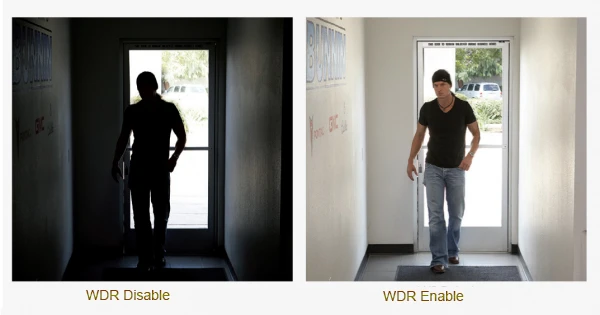
Entrances often have strong backlighting from outside.

Without WDR:

  • individuals may appear as silhouettes
  • facial details are lost

With WDR:

  • both indoor and outdoor lighting are balanced
  • faces and movement remain visible

Lobbies and Reception Areas

Indoor environments frequently combine natural and artificial light.

WDR helps maintain consistent visibility across:

  • windows
  • overhead lighting
  • shaded areas

This improves both monitoring and incident review.

Parking Garages and Exterior Areas

Parking areas and garages often include shadows, headlights, and uneven lighting.

WDR ensures that:

  • vehicles are visible
  • license plates are clearer
  • movement is easier to detect

Access Control Points

Cameras placed near doors and access points must capture accurate visual data.

WDR improves the ability to:

  • verify identity
  • match video to access events
  • maintain situational awareness

This is especially important in integrated systems using platforms such as Cathexis Technologies.

The Risk of Not Using WDR

Without WDR, security footage may:

  • lose detail in bright areas
  • obscure subjects in shadows
  • fail to capture usable evidence

In many cases, this results in footage that is technically recorded—but not useful.

For security teams, this reduces confidence in the system and limits the ability to respond effectively.

How WDR Supports Integrated Security Systems

Modern security systems are not just cameras. They are integrated platforms combining:

  • video surveillance
  • access control
  • intercom systems (such as Akuvox)
  • visitor management solutions

In these environments, video must align with system events.

WDR ensures that visual data is:

  • consistent
  • reliable
  • usable across systems

When video quality is compromised, integration loses value.

Real-World Impact

Consider a secured entrance.

Without WDR:

  • a person entering from bright daylight may appear unrecognizable

With WDR:

  • facial details are preserved
  • movement is clearly captured
  • events can be verified accurately

This difference directly affects the usefulness of recorded footage.

When WDR Is Most Important

WDR should be prioritized in environments with:

  • strong backlighting
  • mixed indoor and outdoor lighting
  • shadows and uneven illumination
  • critical identification points

In these scenarios, WDR is not optional—it is essential.

Wide dynamic range is a critical feature in modern security cameras.

It ensures that cameras can adapt to real-world lighting conditions and provide clear, usable footage.

For organizations, this means:

  • better visibility
  • improved identification
  • more reliable incident review

Security systems must perform in environments where lighting is unpredictable.

Wide dynamic range ensures that cameras capture meaningful, actionable footage—regardless of lighting conditions.

At PMT Security, we focus on deploying video solutions that perform in real-world conditions, where clarity and reliability are essential.

Why Wide Dynamic Range Matters in Security Cameras

Share:

  • Share on Twitter Share on Twitter
  • Share on Facebook Share on Facebook
  • Share on LinkedIn Share on LinkedIn
  • Share via Email Share via Email

Frequently Asked Questions (FAQs)

What is WDR in security cameras?

WDR (wide dynamic range) balances bright and dark areas so cameras capture clear detail in high-contrast lighting.

Why is WDR important?

It prevents overexposed and shadowed footage, ensuring faces and key details remain visible.

Where should WDR be used?

At entrances, lobbies, parking areas, and anywhere with mixed or backlighting.

WDR vs HDR—what’s the difference?

Firmware should be reviewed regularly and updated as part of a planned maintenance schedule.

Contact Us

PMT Security Inc. is here to help, contact us directly by phone,

USA +1 727-786-1900
CAD +1 647-999-4644

Monday-Friday, 8am-5pm Eastern

Knowledge Database
Technical Support
Download Center

CathexisVision Mobile: Secure Video Management Anywhere

CathexisVision Mobile: Secure Video Management Anywhere

In modern physical security environments, mobility isn’t a convenience — it’s a necessity. Whether you’re managing a single facility or a distributed multi-site operation, security teams need reliable access to live and recorded video, event notifications, and system controls without being tied to a control room.

The CathexisVision Mobile feature extends the power of the CathexisVision video management system (VMS) directly to your smartphone or tablet — delivering real-time situational awareness and rapid response capabilities in the palm of your hand.

At PMT Security, we see mobile video access as a critical layer in building responsive, adaptable security ecosystems.

What Is CathexisVision Mobile?

CathexisVision Mobile is a dedicated mobile application within the CathexisVision Suite that enables users to:

  • View live and recorded video
  • Receive and respond to event notifications
  • Perform video searches
  • Control system outputs
  • Manage layouts and camera views

It brings core VMS functionality to mobile devices while maintaining the performance and reliability expected in professional security environments.

Simple Operation in the Field

Security technology should reduce complexity — not add to it. CathexisVision Mobile focuses on usability and speed.

Key usability benefits:

  • Easy-to-navigate modern interface
  • Intuitive camera selection
  • Fast video streaming
  • Responsive layout switching

For mobile users such as site managers, supervisors, or facilities personnel, this means quick access to critical footage without extensive training or delay.

Quick Analysis When It Matters Most

Mobile access is most valuable when rapid insight is required.

CathexisVision Mobile supports:

  • Event notifications for immediate awareness
  • Motion search functionality to quickly isolate activity
  • Snap search tools for efficient review
  • Playback access to recorded video

Instead of waiting to return to a workstation, authorized users can investigate incidents immediately — whether responding to an alarm, checking after-hours activity, or verifying operational procedures.

Greater Control Beyond Viewing

Modern video management systems extend beyond passive monitoring. CathexisVision Mobile supports interactive system control, allowing users to:

  • Trigger and manage control outputs
  • Use advanced viewing layouts
  • Save bookmarks for key video moments
  • Adjust video scaling options

This allows teams to not only observe events, but actively respond from anywhere.

Customizable Mobile Monitoring

Every organization’s operational environment is different. CathexisVision Mobile provides flexible configuration options, including:

  • Multi-tab navigation
  • Saved camera layouts
  • Automatic monitoring events
  • Interactive maps for visual navigation

These customization features ensure mobile monitoring aligns with real-world workflows — whether in education, healthcare, manufacturing, government, retail, or residential environments.

Why Mobile VMS Access Matters

From our experience at PMT Security, mobility enhances:

1. Faster Response Times

Immediate alerts and remote access reduce delays in verification and decision-making.

2. Operational Flexibility

Security leaders and facilities managers are rarely stationary. Mobile VMS access supports real-world movement.

3. Improved Oversight Across Sites

For multi-location organizations, centralized systems paired with mobile visibility allow leadership to stay informed across distributed environments.

4. Business Continuity

In the event of after-hours incidents, weather disruptions, or emergency situations, remote video access becomes essential.

Integrating Mobile into a Unified Security Ecosystem

CathexisVision Mobile works as part of the broader CathexisVision Suite, which includes:

  • Enterprise and multi-site management
  • Carbon client desktop applications
  • Web client access
  • Integration with access control and third-party systems

When integrated into a unified security architecture — such as those designed and supported by PMT Security — mobile access strengthens the overall resilience and transparency of the system.


Mobile video management is no longer an add-on feature — it is a foundational element of modern security operations.

The CathexisVision Mobile feature delivers:

  • Practical field usability
  • Rapid video analysis
  • Interactive system control
  • Flexible configuration

For organizations seeking greater agility in their security operations, mobile access helps bridge the gap between monitoring and action — ensuring visibility is never limited by location.

CathexisVision Mobile: Secure Video Management Anywhere

Share:

  • Share on Twitter Share on Twitter
  • Share on Facebook Share on Facebook
  • Share on LinkedIn Share on LinkedIn
  • Share via Email Share via Email

Contact Us

PMT Security Inc. is here to help, contact us directly by phone,
USA +1 727-786-1900
CAD +1 647-999-4644

Monday-Friday, 8am-5pm Eastern

Knowledge Database
Technical Support
Download Center

What Is ANPR? How Automatic Number Plate Recognition Strengthens Modern Security

What Is ANPR? How Automatic Number Plate Recognition Strengthens Modern Security

Vehicle access control has evolved. Today, organizations need more than a gate and a security guard — they need accurate, automated identification that works in real time, in all lighting conditions, and at any vehicle speed. That’s where Automatic Number Plate Recognition (ANPR) technology comes in.

At PMT Security, we work with advanced video management platforms like CathexisVision to help organizations implement intelligent, integrated vehicle monitoring systems that enhance both safety and operational efficiency.

Let’s break down how ANPR works — and why it’s becoming a critical part of modern physical security strategies.

What Is ANPR (Automatic Number Plate Recognition)?

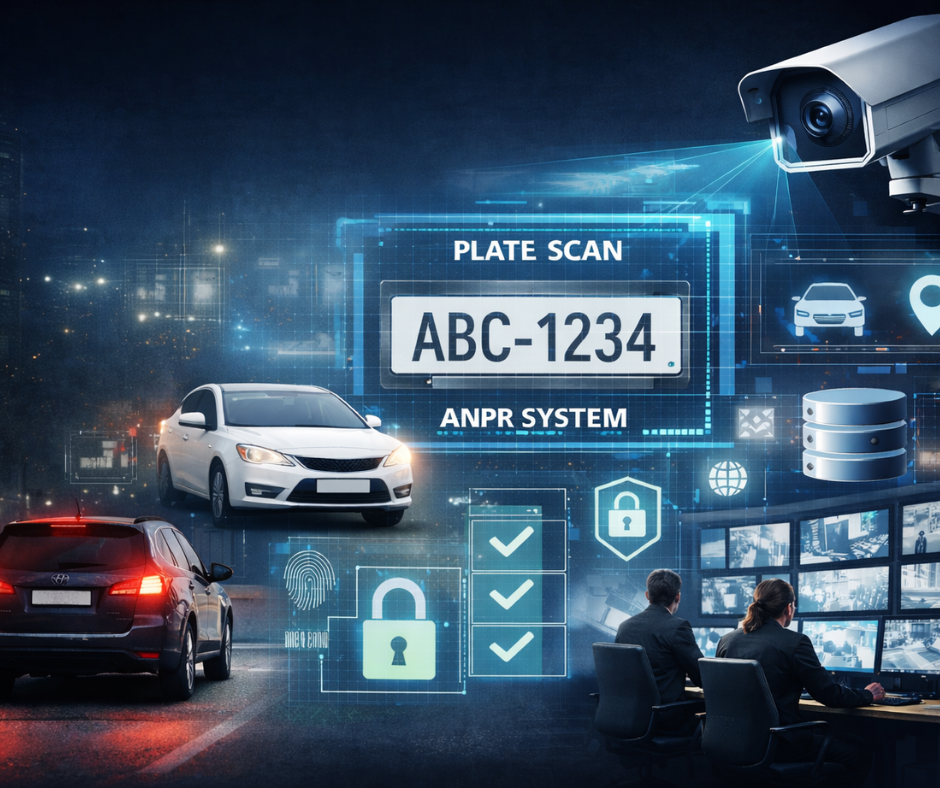
Automatic Number Plate Recognition (ANPR) is a video analytics technology that uses specialized cameras and algorithms to automatically capture, read, and record vehicle license plates.

CathexisVision ANPR :

  • Identifies and captures number plate information
  • Works in both low-speed and high-speed environments
  • Operates 24/7 in various lighting conditions
  • Compares captured plates against databases (blacklists or whitelists)
  • Triggers automated actions based on results

In simple terms, ANPR transforms a camera into an intelligent checkpoint.

From Passive Recording to Proactive Awareness

For years, video surveillance systems functioned primarily as evidence tools. An incident would occur, and footage would be reviewed afterward.

AI analytics change that model by:

  • Detecting events as they happen
  • Reducing reliance on manual monitoring
  • Enabling automated notifications
  • Supporting data-driven security decisions

This shift moves security operations from reactive investigation to proactive response.

Research from organizations such as Gartner has highlighted the growing integration of AI into physical security platforms, noting that analytics increasingly serve as operational intelligence tools rather than simple surveillance enhancements.

How ANPR Technology Works

ANPR systems combine:

  1. Specialized IP Cameras
    Equipped with infrared sensors and high-speed shutters to capture clear images regardless of time of day or vehicle speed
  2. Advanced Recognition Algorithms
    CathexisVision uses world-leading algorithms capable of recognizing license plates from over 200 countries
  3. Database Matching
    Captured license plates are automatically compared to predefined groups such as:
    • Blacklists
    • Whitelists
    • Employees
    • Contractors
  4. Automated Responses
    The system can trigger actions such as:
    • Opening a gate for authorized vehicles
    • Generating alerts for flagged vehicles
    • Logging entry times for audit tracking

This integration of hardware, software, and automation reduces manual oversight and increases response speed.nce.

Key Features of CathexisVision ANPR

Notable capabilities include:

✔ Recognition Across 200+ Countries

Useful for international facilities, campuses, or border-adjacent properties.

✔ Works With Visible Light and Infrared Cameras

Ensures accurate capture during:

  • Daylight
  • Nighttime
  • Poor weather conditions

✔ Predetermined Actions

Organizations can configure automatic responses based on vehicle classification.

✔ Seamless Camera Setup

Cameras can be installed at various heights and angles without compromising accuracy.

✔ Advanced Database Mining

The system allows users to:

  • Identify traffic patterns
  • Search historical data
  • Analyze repeat visits

Real-World Applications of ANPR

ANPR technology is particularly effective in:

Parking & Access Control

Automatically grant access to employees or tenants while restricting unauthorized vehicles.

Commercial & Industrial Sites

Monitor contractor vehicles and track time-based access.

Residential Communities

Streamline resident entry while maintaining visitor tracking.

Freeway & Traffic Monitoring

Capture high-speed vehicle data for enforcement or analytics.

Multi-Site Facilities

The system can generate “visit location” or “visit area” triggers if a vehicle appears multiple times within a defined period.

Traffic Rules & Intelligent Alerts

CathexisVision’s more advanced features include,

  • Visit Location Trigger
    Alert generated if a plate is seen repeatedly at the same location within a defined timeframe.
  • Visit Area Trigger
    Alert generated if a plate appears across multiple monitored locations.
  • Remote HTTP Notifications
    ANPR events (plate image, frame image, metadata) can be pushed to remote servers for integration with other systems.

This makes ANPR highly compatible with broader security ecosystems.on.

Important Considerations for Proper ANPR Deployment

While ANPR is powerful, performance depends on:

  • Proper camera placement
  • Hardware specifically designed for ANPR
  • Correct lighting configuration
  • Site-specific setup

Note, cameras must be ANPR hardware and location-specific to ensure top performance and accurate plate capture.

This is why proper system design matters.

Privacy & Compliance in Canada

When implementing ANPR systems in Canada, organizations must consider:

  • Provincial privacy legislation (e.g., PIPEDA compliance)
  • Clear data retention policies
  • Secure storage of captured plate data
  • Transparent notification signage where required

ANPR systems should always be configured with responsible data governance in mind.

Privacy Considerations for ANPR & Security Systems (USA)

If deploying ANPR or analytics in the U.S., additional caution is required.

License plates may be considered:

  • Personal data (in some states)
  • Sensitive location-based information

Some cities (like parts of California) regulate:

  • Automated License Plate Reader (ALPR) usage
  • Data retention limits
  • Sharing policies

Clients are advised to consult local laws.

How ANPR Fits into a Modern Integrated Security Strategy

ANPR is most effective when integrated into a broader ecosystem that includes:

  • Access control systems
  • Video management software (VMS)
  • Intercom systems
  • Visitor management platforms
  • Audit reporting tools

At PMT Security, we focus on integrated security environments where technologies work together — not in isolation.

ANPR doesn’t replace traditional access control; it enhances it.

Frequently Asked Questions (FAQs)

What are AI video analytics?

AI video analytics use intelligent algorithms to analyze video footage in real time, identifying patterns, objects, or behaviors such as license plates, faces, or motion events.

How do ANPR security cameras work?

YANPR cameras capture an image of a vehicle’s license plate, process it using optical character recognition (OCR), and compare it against stored databases for automated action.

Do ANPR systems work at night?

Yes. Infrared-enabled ANPR cameras capture clear plate images in low-light or nighttime conditions

Can ANPR integrate with access control systems?

Yes. ANPR can trigger gate access, alerts, and logging when integrated with compatible security platforms


Automatic Number Plate Recognition is no longer reserved for highways or law enforcement. It’s a practical, scalable solution for commercial properties, campuses, residential communities, and multi-site organizations.

When properly designed and integrated, ANPR improves:

  • Security visibility
  • Access efficiency
  • Incident response
  • Operational insight

And most importantly — it helps organizations move from reactive monitoring to intelligent automation.

What Is ANPR? How Automatic Number Plate Recognition Strengthens Modern Security

CathexisVision Features-ANPRDownload

Share:

  • Share on Twitter Share on Twitter
  • Share on Facebook Share on Facebook
  • Share on LinkedIn Share on LinkedIn
  • Share via Email Share via Email

Contact Us

PMT Security Inc. is here to help, contact us directly by phone,

USA +1 727-786-1900
CAD +1 647-999-4644

Monday-Friday, 8am-5pm Eastern

Knowledge Database
Technical Support
Download Center

How AI-Powered Video Analytics Are Transforming Physical Security

How AI Video Analytics Are Transforming Physical Security

As physical security systems evolve, organizations are looking beyond basic surveillance toward tools that provide actionable intelligence. AI-powered video analytics are helping security teams move from passive recording to proactive awareness — improving response times, visibility, and operational insight across industries.

What Are AI-Powered Video Analytics?

AI video analytics use machine learning algorithms to analyze video streams and identify patterns, behaviors, and events automatically.

Unlike traditional motion detection, modern analytics can:

  • Distinguish between people, vehicles, and objects
  • Detect unusual behavior (loitering, perimeter breaches, crowd formation)
  • Trigger alerts based on predefined rules
  • Correlate video with access control and other system data

These systems do not “replace” security personnel — they augment human awareness, helping teams focus attention where it’s needed most.

According to the U.S. National Institute of Standards and Technology (NIST), AI systems in surveillance applications must balance accuracy, bias mitigation, and operational reliability to be effective in real-world environments (NIST AI Risk Management Framework, 2023).

From Passive Recording to Proactive Awareness

For years, video surveillance systems functioned primarily as evidence tools. An incident would occur, and footage would be reviewed afterward.

AI analytics change that model by:

  • Detecting events as they happen
  • Reducing reliance on manual monitoring
  • Enabling automated notifications
  • Supporting data-driven security decisions

This shift moves security operations from reactive investigation to proactive response.

Research from organizations such as Gartner has highlighted the growing integration of AI into physical security platforms, noting that analytics increasingly serve as operational intelligence tools rather than simple surveillance enhancements.

Real-World Applications Across Sectors

AI video analytics are not one-size-fits-all. Their value depends heavily on environment and objectives.

Education

In schools and campuses, analytics can help identify:

  • After-hours movement
  • Unusual gathering patterns
  • Perimeter breaches

When integrated with access control systems, these alerts can support faster lockdown decisions and improve situational awareness during emergencies.

Healthcare & Senior Living

In retirement and long-term care environments, analytics may support:

  • Fall detection alerts
  • Monitoring restricted areas
  • Identifying wandering behaviors

These tools are not replacements for care staff — but they can provide an additional layer of oversight in environments where visibility is critical.

Retail & Commercial Facilities

Retailers use analytics to:

  • Monitor high-traffic zones
  • Detect loitering near entrances
  • Analyze customer flow patterns

Beyond security, some organizations use anonymized analytics data to improve layout planning and staffing strategies.

Industrial & Manufacturing

Manufacturing environments benefit from:

  • Perimeter breach detection
  • Restricted-zone monitoring
  • Vehicle tracking in loading areas

Analytics can enhance both security and safety compliance.

The Power of Integration

AI video analytics deliver the most value when integrated into a broader security ecosystem.

When video systems communicate with access control platforms, visitor management tools, and alert systems, organizations can:

  • Cross-reference access events with video footage
  • Automate alerts based on credential misuse
  • Generate detailed audit trails
  • Improve incident response timelines

The future of physical security is not about isolated systems — it’s about interoperability.

Important Considerations Before Deployment

AI analytics are powerful, but implementation requires thoughtful planning.

1. Infrastructure Readiness

AI processing requires sufficient bandwidth, storage, and computing capacity — whether on-premise or cloud-based.

2. Privacy & Compliance

Organizations must ensure compliance with local privacy regulations. In Canada, this may involve alignment with PIPEDA guidelines regarding video surveillance and personal information.

3. False Positives & Tuning

Analytics systems must be configured carefully. Poor calibration can lead to alert fatigue, which reduces effectiveness.

4. Bias & Accuracy

AI systems are only as good as the data they are trained on. NIST and other regulatory bodies emphasize ongoing testing and performance evaluation.

Where AI in Physical Security Is Headed

Looking ahead, several developments are shaping the next phase of analytics:

  • Predictive behavior modeling
  • Deeper integration with access credentials
  • Edge computing for faster processing
  • Improved anomaly detection with lower false alarm rates

The goal is not simply more alerts — it’s better context.

Security leaders are increasingly evaluating systems based on how well they support operational clarity, compliance, and decision-making — not just camera resolution.


AI-powered video analytics are reshaping physical security by turning video data into actionable insight.

When thoughtfully implemented and responsibly managed, these tools can:

  • Enhance visibility
  • Support faster response
  • Reduce monitoring fatigue
  • Strengthen overall security posture

As with any technology, success depends on planning, integration, and alignment with organizational goals.

Physical security is evolving — and analytics are helping lead that evolution.

Evaluating AI analytics for your facility?

Our practical checklist helps you assess:

  • Infrastructure readiness
  • Integration capabilities
  • Privacy considerations
  • Alert configuration strategy
  • Long-term scalability

Download the free checklist to guide your planning process.

Download Now
How AI-Powered Video Analytics Are Transforming Physical Security

Share:

  • Share on Twitter Share on Twitter
  • Share on Facebook Share on Facebook
  • Share on LinkedIn Share on LinkedIn
  • Share via Email Share via Email

Contact Us

PMT Security Inc. is here to help, contact us directly by phone,

USA +1 727-786-1900
CAD +1 647-999-4644

Monday-Friday, 8am-5pm Eastern

Knowledge Database
Technical Support
Download Center
  • Page 1
  • Page 2
  • Page 3
  • Interim pages omitted …
  • Page 5
  • Go to Next Page »
  • Facebook
  • LinkedIn
  • Twitter

PMT Security

Copyright © 2026 PMT Security, Inc. | All Rights Reserved

  • Privacy Policy
  • Terms of Use
  • Cookie Policy
  • Accessibility
  • Contact Us