
Access Control Audit Trails: What They Reveal
Access control systems do more than lock and unlock doors.
They create a record of activity.
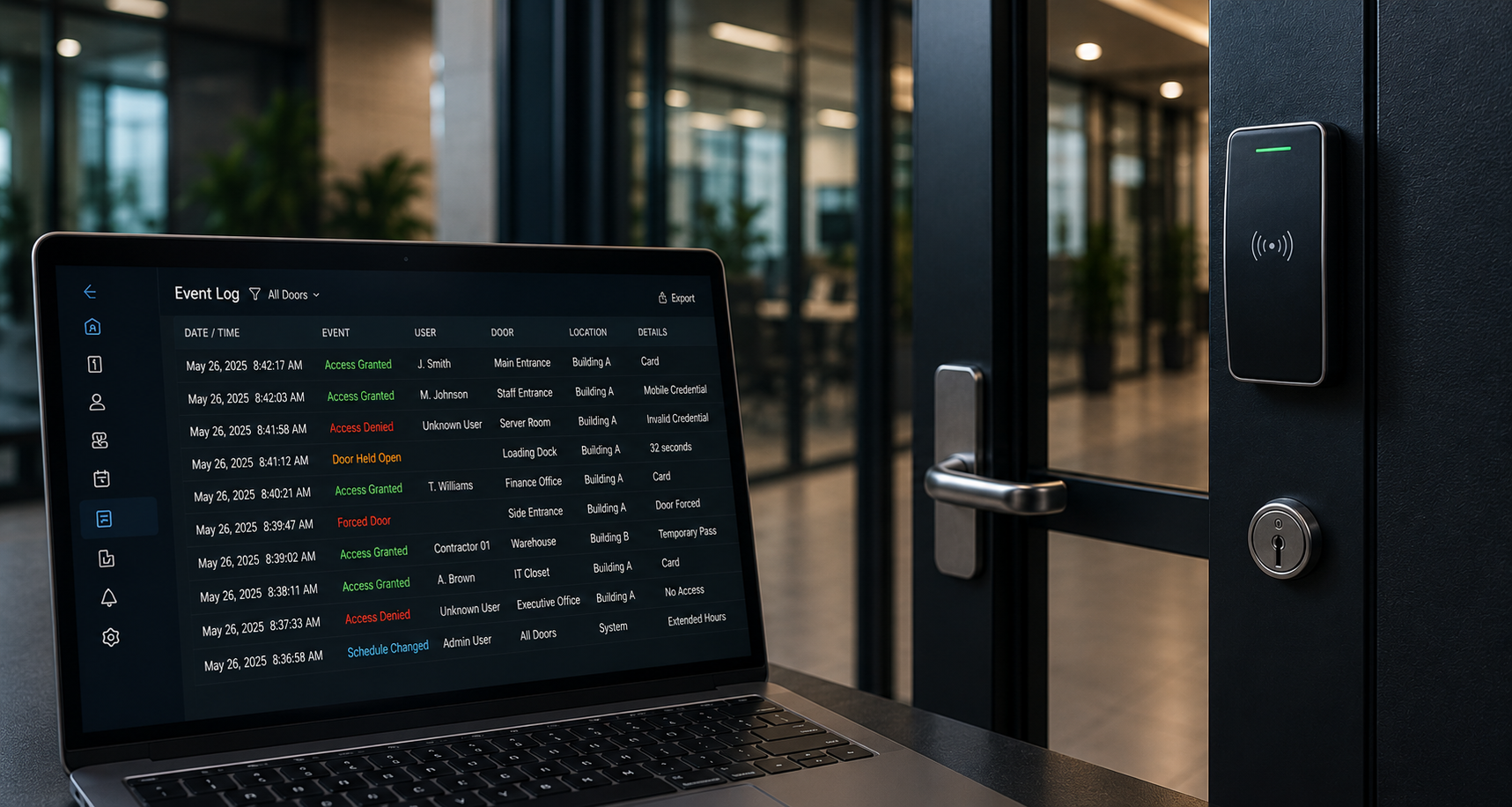
Every credential used, every door event, every denied access attempt, every schedule change, and every administrative action can help tell a larger story about how a facility is being used.
That record is called an audit trail.
For schools, healthcare facilities, long-term care communities, manufacturing plants, commercial properties, government buildings, and multi-site organizations, access control audit trails can be one of the most useful tools in a physical security system.
The value is not just in knowing that a door opened.
The value is understanding who was involved, when it happened, where it happened, whether it matched normal activity, and what should be reviewed next.
What Is an Access Control Audit Trail?
An access control audit trail is a detailed record of activity within an access control system.
Depending on the system design and configuration, an audit trail may include:
- Valid access events
- Denied access attempts
- Forced-door events
- Door-held-open events
- Unlock and relock activity
- Credential usage
- User permission changes
- Schedule changes
- Door mode changes
- Administrator actions
- Alarm acknowledgements
- Access group updates
- System events
- Visitor or temporary credential activity
In simple terms, an audit trail helps answer:
Who did what?
Where did it happen?
When did it happen?
Was it expected?
Does it need follow-up?.
Why Audit Trails Matter
Many organizations think about access control as a way to prevent unauthorized entry.
That is only part of the value.
Access control also supports accountability.
If a restricted room is accessed after hours, the audit trail can help identify which credential was used. If a former employee still has active access, the system review may reveal that offboarding procedures need improvement. If a door is repeatedly held open, the issue may be operational, technical, or procedural.
An audit trail gives facility teams and security managers better visibility into daily activity.
It can help identify:
- Doors that are being used outside normal hours
- Credentials that are active but should be removed
- Access levels that are too broad
- Repeated denied access attempts
- Doors that are frequently propped open
- Areas where staff need clearer procedures
- Contractor or vendor access that should be limited
- Security events that need video verification
- Administrative changes that should be reviewed
Audit trails are not only useful after an incident.
They are useful before small issues become larger security concerns.
What Access Control Audit Trails Can Reveal
1. Who Is Entering the Facility
One of the most basic functions of an audit trail is showing which credential was used at a door.
This can help organizations review:
- Employee access
- Contractor access
- Vendor access
- Visitor credentials
- Temporary credentials
- Mobile credentials
- Cards or fobs assigned to specific users
- After-hours access
This information becomes especially important in buildings with multiple entrances, restricted spaces, service areas, or sensitive rooms.
A strong access control environment should avoid shared credentials whenever possible. Individual credentials create better accountability and make event review more meaningful.
2. When Access Is Happening
Audit trails help show patterns over time.
For example, a facility may discover that a certain door is being used much earlier or later than expected. A service entrance may be active outside scheduled hours. A restricted room may be accessed on weekends. A side door may be used more often than the main entrance.
Time-based review can help identify:
- After-hours access
- Weekend activity
- Shift change patterns
- Cleaning or maintenance access
- Delivery activity
- Contractor access windows
- Unusual late-night or early-morning entries
- Doors that need schedule updates
This does not always mean something is wrong.
Sometimes the audit trail simply reveals that the access rules no longer match how the building operates.
That is still important.
A security system should reflect real facility workflows.
3. Where Access Is Being Attempted
Audit trails can show which doors, rooms, gates, or areas are receiving the most activity.
This helps organizations understand movement through the facility.
High-use areas may need better monitoring, clearer procedures, or additional support. Low-use doors may need to be reviewed to confirm whether they should remain active. Repeated activity at a restricted door may indicate confusion, outdated permissions, or a need for better signage.
Common areas to review include:
- Main entrances
- Staff entrances
- Delivery doors
- Server rooms
- Medication rooms
- Records rooms
- Mechanical rooms
- IT closets
- Production areas
- Loading docks
- Parking gates
- Outdoor yards
- Resident safety areas
- School administrative areas
Knowing where access is happening helps organizations make better decisions about door schedules, permissions, camera placement, intercom use, and visitor workflows.
4. Denied Access Attempts
Denied access events can be especially useful.
A denied access attempt may happen for many reasons. A user may be at the wrong door. A credential may be expired. A schedule may be incorrect. A staff member may have changed roles. A contractor may be trying to enter outside approved hours.
Denied access can reveal:
- Incorrect access levels
- Expired credentials
- Users attempting to access restricted areas
- Confusion about approved doors
- Credential sharing concerns
- Former users who were not fully removed
- After-hours access attempts
- Doors that need better communication or signage
A single denied access event may not be serious.
A pattern of denied access attempts should be reviewed.
5. Door-Held-Open Events
Door-held-open events are often overlooked, but they can reveal major security gaps.
A secure door only works if it closes and latches properly.
If a door is repeatedly held open, it may mean:
- Staff are propping it open for convenience
- Deliveries are not properly managed
- The door closer needs adjustment
- The latch is not working correctly
- The door is used for a workflow it was not designed to support
- Users do not understand the security expectation
- The alarm timing is too short or too long
- The area needs a different access strategy
A held-open door may not be a technology failure.
It may be a workflow problem.
Audit trails help identify where those problems are happening.
6. Forced-Door Events
A forced-door event usually means the door opened without a valid access event.
This could indicate a security concern, but it could also be caused by a mechanical issue, door hardware problem, emergency use, improper closure, or system configuration issue.
Forced-door events should be reviewed with care.
The audit trail can help identify:
- Time of event
- Door location
- Whether a valid access event occurred nearby
- Whether the door was previously held open
- Whether activity happened after hours
- Whether staff were present
- Whether video should be reviewed
- Whether the door hardware needs inspection
This is where integrated systems become especially valuable.
A forced-door event is more useful when paired with video context.
7. Credential Management Issues
Access control audit trails can reveal problems with credential management.
For example:
- Former employees still have active credentials
- Staff have access to areas they no longer use
- Contractors have long-term access instead of temporary access
- Duplicate credentials exist
- Shared cards are being used
- Lost cards were not disabled
- Access levels are too broad
- Users are assigned to outdated access groups
Credential management is one of the most important parts of access control.
Even a strong system can become weak if credentials are not reviewed regularly.
Audit trails support that review.
8. Visitor, Vendor, and Contractor Activity
Modern access control often supports more than employee entry.
Many organizations need to manage visitors, vendors, contractors, volunteers, inspectors, delivery drivers, cleaning staff, maintenance teams, and temporary users.
Audit trails can help review:
- Temporary access usage
- Contractor access windows
- Vendor entry points
- Visitor credential activity
- QR code or temporary pass usage
- After-hours service activity
- Areas accessed during scheduled work
- Whether access was limited by time and location
This is especially important in environments where non-employees may need controlled access without receiving broad permissions.
When visitor management and access control work together, organizations gain better accountability at the front entrance and beyond.
9. Administrative Changes
Access control audit trails can also show system administration activity.
This is important because security does not only depend on door hardware and credentials.
It also depends on who can make changes.
Administrative audit trails may show:
- Users added or removed
- Access groups changed
- Schedules updated
- Doors unlocked or relocked
- Permissions modified
- Reports generated
- Alarms acknowledged
- System settings changed
- Administrator logins
Administrative review helps ensure that access control changes are intentional, documented, and appropriate.
It is good practice to review who has administrative permissions and whether those permissions still match the person’s role.
10. Gaps Between Policy and Reality
One of the most important things an audit trail can reveal is whether written policy matches daily behavior.
A facility may have a policy that says contractors only use one entrance, but the audit trail may show they are entering through multiple doors. A school may expect visitors to enter through the main office, but side-door activity may tell a different story. A manufacturing site may have restricted areas, but access records may show that permissions are too broad.
Audit trails reveal what is actually happening.
That insight can help organizations update:
- Door schedules
- Access levels
- Visitor procedures
- Contractor workflows
- Staff training
- Emergency procedures
- Reporting routines
- Camera placement
- Intercom routing
- System support plans
Security improves when assumptions are replaced with evidence.
Audit Trails Are Stronger With Video Context
An access control event tells part of the story.
Video can help complete it.
For example, an audit trail may show that a credential was used at 8:42 p.m. at a staff entrance. Video can help confirm whether the credential holder was present, whether someone followed behind them, whether the door closed properly, or whether another person entered at the same time.
Video context can support review of:
- Forced-door events
- Door-held-open events
- Denied access attempts
- After-hours access
- Visitor activity
- Deliveries
- Contractor access
- Restricted room activity
- Emergency events
This is why integrated access control and video surveillance are so valuable.
The audit trail shows the event.
Video helps explain the event.
How Often Should Audit Trails Be Reviewed?
Audit trails should not only be reviewed after something goes wrong.
A regular review schedule helps organizations find small problems early.
Recommended review points may include:
- Weekly review of critical doors
- Monthly review of denied access attempts
- Monthly review of door-held-open and forced-door events
- Quarterly review of active users and credentials
- Quarterly review of administrator permissions
- Seasonal review of door schedules
- Annual review of access groups and restricted areas
- Immediate review after a security incident, staffing change, or facility change
The right schedule depends on the size of the facility, industry requirements, staffing levels, security risk, and the number of users and doors.
Questions to Ask During an Audit Trail Review
When reviewing access control reports, consider asking:
- Are doors being used the way we expect?
- Are any doors repeatedly held open?
- Are there repeated denied access attempts?
- Are former employees, contractors, or temporary users still active?
- Are access levels too broad?
- Are restricted areas properly controlled?
- Are after-hours events expected or unusual?
- Are visitor and contractor workflows documented?
- Are administrative changes reviewed?
- Do access events have video context where needed?
- Are reports being reviewed by the right people?
- Are system changes documented clearly?
The goal is not to create more paperwork.
The goal is to create better security decisions.
Access Control Reporting and PMT Security
PMT Security supports access control solutions designed to help organizations manage doors, users, credentials, schedules, permissions, events, and reporting.
For organizations using systems such as OMNIA access control, reporting and event review can support daily security operations, audits, investigations, and long-term system planning.
Audit trails can be especially useful when access control is planned alongside video surveillance, visitor management, smart intercoms, cloud-managed networking, and technical support.
A stronger security system is not only about controlling entry.
It is about creating visibility, accountability, and confidence.
Common Audit Trail Mistakes to Avoid
Only Reviewing Reports After an Incident
Audit trails are more valuable when they are reviewed regularly. Waiting until after a serious event may mean smaller warning signs were missed.
Keeping Old Credentials Active
Former staff, expired contractors, old vendors, and unused credentials should be reviewed and removed as part of routine access control maintenance.
Giving Too Many Users Broad Access
Access levels should match the person’s role. Broad access may be convenient, but it can reduce accountability and increase risk.
Ignoring Door-Held-Open Events
A door that is frequently propped open can weaken the entire access control plan.
Not Connecting Access Events to Video
Access records are helpful. Video context can make them much more useful.
Forgetting About Administrators
Admin permissions should be reviewed. The people who can change the system can affect the security of the entire facility.
Access control audit trails reveal more than who opened a door.
They reveal patterns, gaps, risks, habits, workflows, and opportunities for improvement.
They can show whether access rules still match how the facility operates. They can help identify credentials that need cleanup, doors that need attention, visitors that need better tracking, and events that deserve video review.
A strong access control system should not only control movement.
It should help organizations understand movement.
That is where audit trails become valuable.
PMT Security helps organizations and integrators support access control, video surveillance, visitor management, intercoms, networking, and integrated physical security solutions designed for real-world facilities.
Share:
Frequently Asked Questions (FAQs)
An access control audit trail is a record of activity within an access control system. It may include valid access events, denied access attempts, forced-door events, door-held-open events, credential use, user changes, schedule updates, and administrator actions.
Audit trails help organizations review who accessed a door, when activity happened, whether access was expected, and whether security procedures need improvement. They support accountability, investigation, reporting, and long-term system management.
Access control reports can reveal after-hours activity, denied access attempts, doors that are frequently held open, outdated credentials, broad permissions, contractor access patterns, administrator changes, and gaps between policy and real facility use.
Audit trails should be reviewed regularly, not only after incidents. Many organizations benefit from monthly event reviews, quarterly credential reviews, and immediate reviews after staffing changes, security events, or facility updates.
Video adds context to access control events. A door event may show that a credential was used, but video can help confirm who was present, whether someone followed behind, whether the door closed properly, and what happened before or after the event.
Yes. Audit trails can help review temporary access, contractor schedules, visitor credentials, vendor access, after-hours service activity, and whether non-employee access is properly limited by time and location.
What Are the Risks of Outdated Access Control Systems?
Outdated access control systems may still function—but they can introduce serious security risks. From cloned credentials to weak authentication and lack of system visibility, legacy platforms can expose both physical and digital vulnerabilities. Learn why modernizing access control is critical for protecting people, systems, and data.

Access Control Security: Protecting Systems, Data & Buildings

Modular Access Control System Explained
A modular access control system changes how security is built. Learn how OMNIA’s controller, reader, and IO modules scale from one door to thousands.

What Is an Access Control System? A Complete Guide
Access control systems regulate who can enter buildings and restricted areas using credentials, readers, and management software. This guide explains how modern access control technology works and how it integrates with physical security systems.
OMNIA Access Control Software: Managing Security in Modern Facilities
A look at how OMNIA Access Control software helps organizations manage doors, credentials, and security workflows across modern facilities..
