• Skip to primary navigation
  • Skip to main content
PMT Security Logo

PMT Security

Advanced Access Control

  • Home
  • About Us
    • Our Partners
    • Our Integrators
  • Solutions
    • Residential
    • Government Facilities
    • Education
    • Retirement
    • Manufacturing
    • Retail Businesses
    • Campgrounds & Outdoor Resorts
  • Products
    • Access Control
      • Control Features
      • Reporting & Monitoring
      • Control Module
      • Digital IO Module
      • Reader Module
      • Readers
    • Video Management
      • Integration
      • Analytics
      • Search & Export
    • Visitor Management
  • Support
    • Knowledgebase
    • Download Center
    • License Request
    • RMA Request Form
  • Blog
  • Contact Us

Access Control

Replace 400i Controller over Ethernet

Replace 400i Controller over Ethernet

Amano hardware is by default DHCP enabled.  However, we STRONGLY recommend setting IP addresses on hardware before introducing it to the network.  After you have set the IP address in Discovery, perform the following steps.

Grouping Controllers

Open Discovery.txt(C:\AmanoNet\bin)

  • Select the Controller
  • On the menu bar, go to Configuration > Add to Group.
  • In the Enter Group Name dialog, enter a suitable group name.
  • In the Device Password dialog, enter your password. The Controller’s default password is impro
  • Click on the “Check” button.
  • Click the “Check” button.

Hardware Exchange

Open ACCESS

  1. In the Navigator Pane, click the old Controller to select it.
  2. Right-click the Controller and select the Replace Unit option.
  3. From the Unit Type drop-down list, select the new Controllers unit type.
  4. Enter the new Controllers Fixed Address.
  5. Click the “Check” button.
  6. In Engine, click the “Stop” button.
  7. Click on the “Full Upload” button.
  8. Click on the “Start” button

Need further assistance?

Submit a Support Ticket

Submit a Support Ticket

FAQ

General

Can I initiate RS485 comms to a terminal from an existing IP terminal?

How to Select the Right Cable for the job

IDEMIA Sigma Lite Readers NOT compatible for use in AmanoNet or Nexus220

Network Configuration – Best Practices

Technical Bulletins

Akuvox R20 Wiring Diagram to Wiegand Reader Module (WRM)

Finding and Adding Sigma Biometric Units to OMNIA 4.6.5

How to add a PAC Tag type to a Tag Holder

How to upgrade OMNIA hardware firmware using the OMNIA Firmware Upgrade Tool

OMNIA CSV Imports 

OMNIA Run as a Service fix for v4.x

Setting the IP address of a PMT Security Device by Directly Connecting To It with a Laptop.

Upgrading To OMNIA 4.6.5 and 2019 SQL Express With Tools

Access Control

AmanoNet

AmanoNet Back up using IB Console

AmanoNet Minimum PC Requirements and Specifications

AmanoNet System Migration Notes

Archive Tagholders in AmanoNet

Archive Transactions in AmanoNet

AutoID IP Hardware in AmanoNet

How to get PMTSecurity a copy of the AmanoNet Access Control Database

How to move AmanoNet Access Control System from one PC to another (Firebird)

IDEMIA Sigma Lite Readers NOT compatible for use in AmanoNet or Nexus220

ImproNet/AmanoNet Database Backup: SQL

Nexxus220

Change Default Password in Nexus220
Database Migration from Nexus220/IXP220 to OMNIA
How to fix a Java SE Binary Error in Nexus220 Software
How to get a copy of a database from Nexus220 Software
How to move Nexus220 to a different PC
IDEMIA Sigma Lite Readers NOT compatible for use in AmanoNet or Nexus220
Move Nexus220 Access Control System from one PC to another (Firebird)
Nexus220 Firmware Upgrade
Nexus220 Notifications Configuration/Email Configuration
Nexus220 The number of doors for this license has been exceeded
Nexus220 Web Reports Using Microsoft Edge
Reduce length of time on buzzer for readers in Nexus220

Omnia

Adding a New Department in Omnia

Adding Companies to Omnia

Adding Widgets to the OMNIA Dashboard

Aperio Wireless Lock Integration

Basic Setup Guide:  Akuvox

Basic Trouble Shooting OMNIA

Batch Operations OMNIA

Change SYSDBA Password in OMNIA

Changing the IP Address of a Previously Installed Controller using the Omnia Software/URL

Configuring Web Session Timeouts in OMINA

Omnia Lite

Convert a Nexus Lite Database into OMNIA Lite Database

OMNIA LiTE Backup

PM Tronics Hardware

Amano Readers and Credentials

Change Modulation mode on XQT904 Quad Transmitter
How do I change Wiegand Output Mode on Amano readers?

Legacy Hardware

Factory Reset legacy Amano IP Cameras (sold prior to 2018)

Factory Reset Nexus220 controller

How do I factory reset the EC2 (400i) controller?

Setting IP on PMTronics Inc. Access Control Hardware

Partner Products

Partner Products

IDEMIA Sigma Lite Readers NOT compatible for use in AmanoNet or Nexus220

Installing Cathexis Carbon and Adding a new Account

Setting Read Range on a Conekt Reader

STID Configuration

Video Management Systems

Cathexis Video (Amano Vision)

Adding Cameras into Cathexis

Cathexis Video AV (AntiVirus Exceptions)

Installing Cathexis Carbon and Adding a new Account

Quick Start Guide for Cathexis Vision Version 2025

AmanoDVMS

Which AmanoDVMS ports need to be open on my firewall?

Vision

Adding Cameras into Cathexis

AmanoVision web access user name case sensitivity usage

Change Default Password in Nexus220

Change Default Password in Nexus220

To Change the Default Password for the Sysdba log in password you will need to use IBConsole.

IBConsole is found at  C:\Nexus220\tools\IBConsole
Find Firebird 2.1

Right Click, and choose User Security

Here you will be able to change the sysdba default password.

Need further assistance?

Submit a Support Ticket

Submit a Support Ticket

FAQ

General

Can I initiate RS485 comms to a terminal from an existing IP terminal?

How to Select the Right Cable for the job

IDEMIA Sigma Lite Readers NOT compatible for use in AmanoNet or Nexus220

Network Configuration – Best Practices

Technical Bulletins

Akuvox R20 Wiring Diagram to Wiegand Reader Module (WRM)

Finding and Adding Sigma Biometric Units to OMNIA 4.6.5

How to add a PAC Tag type to a Tag Holder

How to upgrade OMNIA hardware firmware using the OMNIA Firmware Upgrade Tool

OMNIA CSV Imports 

OMNIA Run as a Service fix for v4.x

Setting the IP address of a PMT Security Device by Directly Connecting To It with a Laptop.

Upgrading To OMNIA 4.6.5 and 2019 SQL Express With Tools

Access Control

AmanoNet

AmanoNet Back up using IB Console

AmanoNet Minimum PC Requirements and Specifications

AmanoNet System Migration Notes

Archive Tagholders in AmanoNet

Archive Transactions in AmanoNet

AutoID IP Hardware in AmanoNet

How to get PMTSecurity a copy of the AmanoNet Access Control Database

How to move AmanoNet Access Control System from one PC to another (Firebird)

IDEMIA Sigma Lite Readers NOT compatible for use in AmanoNet or Nexus220

ImproNet/AmanoNet Database Backup: SQL

Nexxus220

Database Migration from Nexus220/IXP220 to OMNIA
How to fix a Java SE Binary Error in Nexus220 Software
How to get a copy of a database from Nexus220 Software
How to move Nexus220 to a different PC
IDEMIA Sigma Lite Readers NOT compatible for use in AmanoNet or Nexus220
Move Nexus220 Access Control System from one PC to another (Firebird)
Nexus220 Firmware Upgrade
Nexus220 Notifications Configuration/Email Configuration
Nexus220 The number of doors for this license has been exceeded
Nexus220 Web Reports Using Microsoft Edge
Reduce length of time on buzzer for readers in Nexus220
Replacing Nexus220 Controller with APC Controller and Wiegand Reader Module

Omnia

Adding a New Department in Omnia

Adding Companies to Omnia

Adding Widgets to the OMNIA Dashboard

Aperio Wireless Lock Integration

Basic Setup Guide:  Akuvox

Basic Trouble Shooting OMNIA

Batch Operations OMNIA

Change SYSDBA Password in OMNIA

Changing the IP Address of a Previously Installed Controller using the Omnia Software/URL

Configuring Web Session Timeouts in OMINA

Omnia Lite

Convert a Nexus Lite Database into OMNIA Lite Database

OMNIA LiTE Backup

PM Tronics Hardware

Amano Readers and Credentials

Change Modulation mode on XQT904 Quad Transmitter
How do I change Wiegand Output Mode on Amano readers?

Legacy Hardware

Factory Reset legacy Amano IP Cameras (sold prior to 2018)

Factory Reset Nexus220 controller

How do I factory reset the EC2 (400i) controller?

Setting IP on PMTronics Inc. Access Control Hardware

Partner Products

Partner Products

IDEMIA Sigma Lite Readers NOT compatible for use in AmanoNet or Nexus220

Installing Cathexis Carbon and Adding a new Account

Setting Read Range on a Conekt Reader

STID Configuration

Video Management Systems

Cathexis Video (Amano Vision)

Adding Cameras into Cathexis

Cathexis Video AV (AntiVirus Exceptions)

Installing Cathexis Carbon and Adding a new Account

Quick Start Guide for Cathexis Vision Version 2025

AmanoDVMS

Which AmanoDVMS ports need to be open on my firewall?

Vision

Adding Cameras into Cathexis

AmanoVision web access user name case sensitivity usage

Nexus220 The number of doors for this license has been exceeded

Nexus220 The number of doors for this license has been exceeded

If the Nexus220 database has more than 4 doors, you must have an licensed USB device (typically the Amano RS) properly connected and the correct driver installed before the software can open. Otherwise, you will get an error stating that “The number of doors has been exceeded for this license”.  

In most cases, the unit is simply not plugged in or the driver has not been installed properly.

Verify Devices show in Device Manager

In Device manager, you can verify if the devices exist and have their drivers installed properly.   You may see a couple of different options depending on the Windows version, and device manufacture date.

Look in the ports section for one or more of the following:

MDE USB VCom Port (COMx) 

ImproX USB to UART (COMx)

NEXUS220 VCom (COMx)

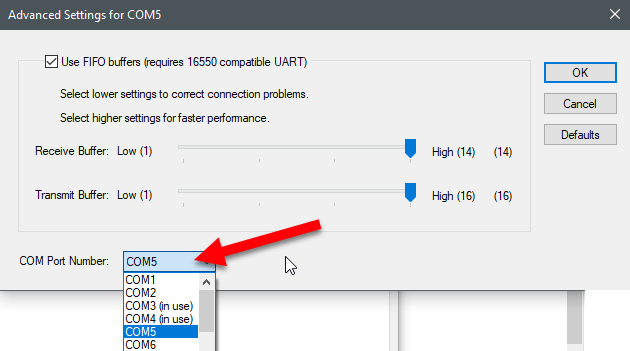
The x in COMx will refer to your local COM port in use for that device.  You MUST make certain that the MDE is at a higher COM Port than the RS if you are using both and that they are both using a COM port below 16.  In cases where you only have an MDE that is licensed (2019 and later), you only need to make sure the COM port is below 16.

NOTE: To open Device Manger, you can press the Windows Key plus the R key to open the run menu, then type devmgmt.msc and press OK.

Install the driver

  1. Download the driver setup application from the website or use this link.
  2. Run the setup.exe file as admin and click through to finish the installation.

Verify the software is trying to detect the license device

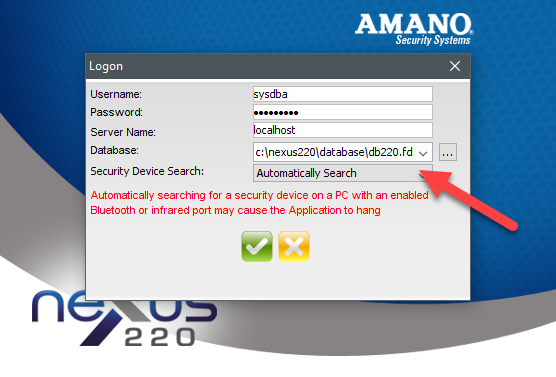
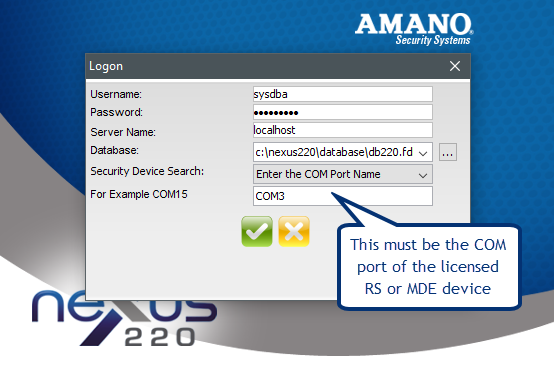
On the Logon screen, ensure “Security Device Search” field is set to Automatically Search.  If you fail to logon due to this automatic search, try manually entering a COM port name of the licensed device.  (e.g COM3, important that you do not use any spaces) 

Common Problems

Problem:  COM Port too high or COM Port of MDE lower than RS device.  Both must be below COM16.

Solution:  Change port to lower COM port number in Device Manger.

Problem:  USB Serial Device generic driver in use.   

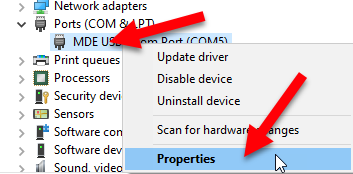
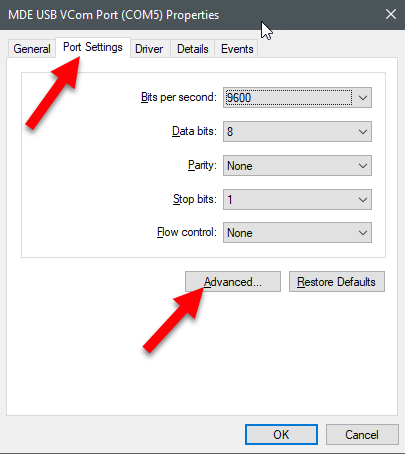
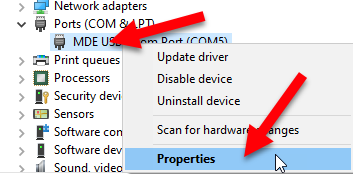
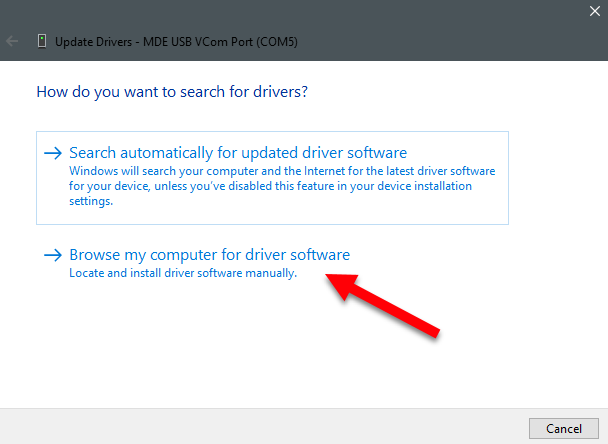
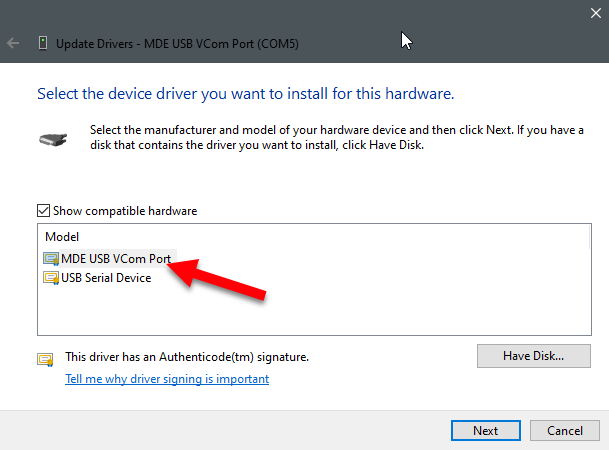
Solution:  You can run the setup.exe and then apply the proper driver. In this case you also may need to go one step further to apply the non generic license. Open device manager and manually change to the MDE driver.  Below are some screenshots from Windows 10 that show how to make this change.

Need further assistance?

Submit a Support Ticket

Submit a Support Ticket

FAQ

General

Can I initiate RS485 comms to a terminal from an existing IP terminal?

How to Select the Right Cable for the job

IDEMIA Sigma Lite Readers NOT compatible for use in AmanoNet or Nexus220

Network Configuration – Best Practices

Technical Bulletins

Akuvox R20 Wiring Diagram to Wiegand Reader Module (WRM)

Finding and Adding Sigma Biometric Units to OMNIA 4.6.5

How to add a PAC Tag type to a Tag Holder

How to upgrade OMNIA hardware firmware using the OMNIA Firmware Upgrade Tool

OMNIA CSV Imports 

OMNIA Run as a Service fix for v4.x

Setting the IP address of a PMT Security Device by Directly Connecting To It with a Laptop.

Upgrading To OMNIA 4.6.5 and 2019 SQL Express With Tools

Access Control

AmanoNet

AmanoNet Back up using IB Console

AmanoNet Minimum PC Requirements and Specifications

AmanoNet System Migration Notes

Archive Tagholders in AmanoNet

Archive Transactions in AmanoNet

AutoID IP Hardware in AmanoNet

How to get PMTSecurity a copy of the AmanoNet Access Control Database

How to move AmanoNet Access Control System from one PC to another (Firebird)

IDEMIA Sigma Lite Readers NOT compatible for use in AmanoNet or Nexus220

ImproNet/AmanoNet Database Backup: SQL

Nexxus220

Change Default Password in Nexus220
Database Migration from Nexus220/IXP220 to OMNIA
How to fix a Java SE Binary Error in Nexus220 Software
How to get a copy of a database from Nexus220 Software
How to move Nexus220 to a different PC
IDEMIA Sigma Lite Readers NOT compatible for use in AmanoNet or Nexus220
Move Nexus220 Access Control System from one PC to another (Firebird)
Nexus220 Firmware Upgrade
Nexus220 Notifications Configuration/Email Configuration
Nexus220 Web Reports Using Microsoft Edge
Reduce length of time on buzzer for readers in Nexus220
Replacing Nexus220 Controller with APC Controller and Wiegand Reader Module

Omnia

Adding a New Department in Omnia

Adding Companies to Omnia

Adding Widgets to the OMNIA Dashboard

Aperio Wireless Lock Integration

Basic Setup Guide:  Akuvox

Basic Trouble Shooting OMNIA

Batch Operations OMNIA

Change SYSDBA Password in OMNIA

Changing the IP Address of a Previously Installed Controller using the Omnia Software/URL

Configuring Web Session Timeouts in OMINA

Omnia Lite

Convert a Nexus Lite Database into OMNIA Lite Database

OMNIA LiTE Backup

PM Tronics Hardware

Amano Readers and Credentials

Change Modulation mode on XQT904 Quad Transmitter
How do I change Wiegand Output Mode on Amano readers?

Legacy Hardware

Factory Reset legacy Amano IP Cameras (sold prior to 2018)

Factory Reset Nexus220 controller

How do I factory reset the EC2 (400i) controller?

Setting IP on PMTronics Inc. Access Control Hardware

Partner Products

Partner Products

IDEMIA Sigma Lite Readers NOT compatible for use in AmanoNet or Nexus220

Installing Cathexis Carbon and Adding a new Account

Setting Read Range on a Conekt Reader

STID Configuration

Video Management Systems

Cathexis Video (Amano Vision)

Adding Cameras into Cathexis

Cathexis Video AV (AntiVirus Exceptions)

Installing Cathexis Carbon and Adding a new Account

Quick Start Guide for Cathexis Vision Version 2025

AmanoDVMS

Which AmanoDVMS ports need to be open on my firewall?

Vision

Adding Cameras into Cathexis

AmanoVision web access user name case sensitivity usage

How to fix a Java SE Binary Error in Nexus220 Software

How to fix a “Java SE Binary Error” in Nexus220 software.

When you open Amano Software, specifically on systems using the IDEMIA (Morphotrak) biometric integration, a Java SE Binary Error may appear on some systems where Data Execution Prevention is turned on to it’s highest setting.  Data Execution Prevention (DEP) prevents harmful code from running in protected memory locations reserved for Windows and other programs. 

WARNING!  Making chances to the Boot Configuration Data Options can cause your computer not to start.  Check with your local computer systems administrator before you proceed. 

The steps below will lower the Data Prevention Execution settings to allow some programs to OptOut of using it.

  1. Run a windows command prompt as an administrator.
  2. Type:  “bcdedit /set nx OptOut”
  3. You will see a message: “The operation completed successfully”  and you will need to restart the PC for the change to take effect.

NOTE: If you receive an error that says “This value is protected by Secure Boot Policy and cannot be modified or deleted” then you’ll need to enter your BIOS to disable secure boot. Booting onto your BIOS varies by the motherboard and is for advanced users only.  Proceed with caution.

How to revive a non-booting machine after setting DEP to AlwaysOff.

  1. If you have a Windows recovery disk, use it to boot your computer.  (You may make a Windows recovery disk from Windows installation media on another working PC)
  2. Once booted, open an command prompt as administrator.
  3. Type: “bcdedit /set nx AlwaysOn”
  4. You will see a message: “The operation completed successfully”  and you will need to restart the PC for the change to take effect.

NOTE: If you receive an error that says “This value is protected by Secure Boot Policy and cannot be modified or deleted” then you’ll need to enter your BIOS to disable secure boot. Booting onto your BIOS varies by the motherboard and is for advanced users only.  Proceed with caution.

Need further assistance?

Submit a Support Ticket

Submit a Support Ticket

FAQ

General

Can I initiate RS485 comms to a terminal from an existing IP terminal?

How to Select the Right Cable for the job

IDEMIA Sigma Lite Readers NOT compatible for use in AmanoNet or Nexus220

Network Configuration – Best Practices

Technical Bulletins

Akuvox R20 Wiring Diagram to Wiegand Reader Module (WRM)

Finding and Adding Sigma Biometric Units to OMNIA 4.6.5

How to add a PAC Tag type to a Tag Holder

How to upgrade OMNIA hardware firmware using the OMNIA Firmware Upgrade Tool

OMNIA CSV Imports 

OMNIA Run as a Service fix for v4.x

Setting the IP address of a PMT Security Device by Directly Connecting To It with a Laptop.

Upgrading To OMNIA 4.6.5 and 2019 SQL Express With Tools

Access Control

AmanoNet

AmanoNet Back up using IB Console

AmanoNet Minimum PC Requirements and Specifications

AmanoNet System Migration Notes

Archive Tagholders in AmanoNet

Archive Transactions in AmanoNet

AutoID IP Hardware in AmanoNet

How to get PMTSecurity a copy of the AmanoNet Access Control Database

How to move AmanoNet Access Control System from one PC to another (Firebird)

IDEMIA Sigma Lite Readers NOT compatible for use in AmanoNet or Nexus220

ImproNet/AmanoNet Database Backup: SQL

Nexxus220

Change Default Password in Nexus220
Database Migration from Nexus220/IXP220 to OMNIA
How to get a copy of a database from Nexus220 Software
How to move Nexus220 to a different PC
IDEMIA Sigma Lite Readers NOT compatible for use in AmanoNet or Nexus220
Move Nexus220 Access Control System from one PC to another (Firebird)
Nexus220 Firmware Upgrade
Nexus220 Notifications Configuration/Email Configuration
Nexus220 The number of doors for this license has been exceeded
Nexus220 Web Reports Using Microsoft Edge
Reduce length of time on buzzer for readers in Nexus220
Replacing Nexus220 Controller with APC Controller and Wiegand Reader Module

Omnia

Adding a New Department in Omnia

Adding Companies to Omnia

Adding Widgets to the OMNIA Dashboard

Aperio Wireless Lock Integration

Basic Setup Guide:  Akuvox

Basic Trouble Shooting OMNIA

Batch Operations OMNIA

Change SYSDBA Password in OMNIA

Changing the IP Address of a Previously Installed Controller using the Omnia Software/URL

Configuring Web Session Timeouts in OMINA

Omnia Lite

Convert a Nexus Lite Database into OMNIA Lite Database

OMNIA LiTE Backup

PM Tronics Hardware

Amano Readers and Credentials

Change Modulation mode on XQT904 Quad Transmitter
How do I change Wiegand Output Mode on Amano readers?

Legacy Hardware

Factory Reset legacy Amano IP Cameras (sold prior to 2018)

Factory Reset Nexus220 controller

How do I factory reset the EC2 (400i) controller?

Setting IP on PMTronics Inc. Access Control Hardware

Partner Products

Partner Products

IDEMIA Sigma Lite Readers NOT compatible for use in AmanoNet or Nexus220

Installing Cathexis Carbon and Adding a new Account

Setting Read Range on a Conekt Reader

STID Configuration

Video Management Systems

Cathexis Video (Amano Vision)

Adding Cameras into Cathexis

Cathexis Video AV (AntiVirus Exceptions)

Installing Cathexis Carbon and Adding a new Account

Quick Start Guide for Cathexis Vision Version 2025

AmanoDVMS

Which AmanoDVMS ports need to be open on my firewall?

Vision

Adding Cameras into Cathexis

AmanoVision web access user name case sensitivity usage

Move Nexus220 Access Control System from one PC to another (Firebird)

Move Nexus220 Access Control System from one PC to another (Firebird)

IMPORTANT!!!! Verify you are installing current or newer version of Nexus220 software than what is currently installed.

From the originating PC

  • Close all software on all computers running Nexus220
  • Copy the database file to an intermediate source such as a flash drive or network drive.
    • Default location: c:\nexus220\database\db220.fdb
  • Copy security file to an intermediate source such as a flash drive or network drive.

Default 32-bit path: c:\program files\firebird_2_1\firebird\security.fdb (This may also be called security2.fdb, or have another number appended to it.)

Default 64-bit path:  c:\program files (x86)\firebird_2_1\firebird\security.fdb (This may also be called security2.fdb, or have another number appended to it.)

*Firebird security file may be named security2.fdb

On new PC where software is being moved to:

IMPORTANT!!!! Verify you are installing current or newer version of Nexus220 software than what is currently installed.

  • Install new instance of software from installation disc or download
  • Rename database created during installation to db220_empty.fdb

Default Location: c:\nexus220\database\db220.fdb

  • Paste database copied from original PC into the c:\nexus220\database\ folder.
  • Rename security.fdb (or security2.fdb) file created during installation to securityOLD.fdb (or security2OLD.fdb respectively)
  • Paste security file copied from the original PC into the appropriate field.
  • Default 32-bit path: c:\program files\firebird_2_1\firebird\security.fdb
  • Default 64-bit path:  c:\program files (x86)\firebird_2_1\firebird\security.fdb
  • When you open the software it will prompt you to upgrade the DB
  • Ensure the database scripts are at or newer than the current version.  If they are older, run the updater tool and note any errors.  If there are errors, stop immediately and call Tech Support.

Need further assistance?

Submit a Support Ticket

Submit a Support Ticket

FAQ

General

Can I initiate RS485 comms to a terminal from an existing IP terminal?

How to Select the Right Cable for the job

IDEMIA Sigma Lite Readers NOT compatible for use in AmanoNet or Nexus220

Network Configuration – Best Practices

Technical Bulletins

Akuvox R20 Wiring Diagram to Wiegand Reader Module (WRM)

Finding and Adding Sigma Biometric Units to OMNIA 4.6.5

How to add a PAC Tag type to a Tag Holder

How to upgrade OMNIA hardware firmware using the OMNIA Firmware Upgrade Tool

OMNIA CSV Imports 

OMNIA Run as a Service fix for v4.x

Setting the IP address of a PMT Security Device by Directly Connecting To It with a Laptop.

Upgrading To OMNIA 4.6.5 and 2019 SQL Express With Tools

Access Control

AmanoNet

AmanoNet Back up using IB Console

AmanoNet Minimum PC Requirements and Specifications

AmanoNet System Migration Notes

Archive Tagholders in AmanoNet

Archive Transactions in AmanoNet

AutoID IP Hardware in AmanoNet

How to get PMTSecurity a copy of the AmanoNet Access Control Database

How to move AmanoNet Access Control System from one PC to another (Firebird)

IDEMIA Sigma Lite Readers NOT compatible for use in AmanoNet or Nexus220

ImproNet/AmanoNet Database Backup: SQL

Nexxus220

Change Default Password in Nexus220
Database Migration from Nexus220/IXP220 to OMNIA
How to fix a Java SE Binary Error in Nexus220 Software
How to get a copy of a database from Nexus220 Software
How to move Nexus220 to a different PC
IDEMIA Sigma Lite Readers NOT compatible for use in AmanoNet or Nexus220
Nexus220 Firmware Upgrade
Nexus220 Notifications Configuration/Email Configuration
Nexus220 The number of doors for this license has been exceeded
Nexus220 Web Reports Using Microsoft Edge
Reduce length of time on buzzer for readers in Nexus220
Replacing Nexus220 Controller with APC Controller and Wiegand Reader Module

Omnia

Adding a New Department in Omnia

Adding Companies to Omnia

Adding Widgets to the OMNIA Dashboard

Aperio Wireless Lock Integration

Basic Setup Guide:  Akuvox

Basic Trouble Shooting OMNIA

Batch Operations OMNIA

Change SYSDBA Password in OMNIA

Changing the IP Address of a Previously Installed Controller using the Omnia Software/URL

Configuring Web Session Timeouts in OMINA

Omnia Lite

Convert a Nexus Lite Database into OMNIA Lite Database

OMNIA LiTE Backup

PM Tronics Hardware

Amano Readers and Credentials

Change Modulation mode on XQT904 Quad Transmitter
How do I change Wiegand Output Mode on Amano readers?

Legacy Hardware

Factory Reset legacy Amano IP Cameras (sold prior to 2018)

Factory Reset Nexus220 controller

How do I factory reset the EC2 (400i) controller?

Setting IP on PMTronics Inc. Access Control Hardware

Partner Products

Partner Products

IDEMIA Sigma Lite Readers NOT compatible for use in AmanoNet or Nexus220

Installing Cathexis Carbon and Adding a new Account

Setting Read Range on a Conekt Reader

STID Configuration

Video Management Systems

Cathexis Video (Amano Vision)

Adding Cameras into Cathexis

Cathexis Video AV (AntiVirus Exceptions)

Installing Cathexis Carbon and Adding a new Account

Quick Start Guide for Cathexis Vision Version 2025

AmanoDVMS

Which AmanoDVMS ports need to be open on my firewall?

Vision

Adding Cameras into Cathexis

AmanoVision web access user name case sensitivity usage

  • « Go to Previous Page
  • Page 1
  • Interim pages omitted …
  • Page 15
  • Page 16
  • Page 17
  • Page 18
  • Go to Next Page »

PMT Security

Copyright © 2025 PMT Security, Inc. | All Rights Reserved