• Skip to primary navigation
  • Skip to main content
PMT Security Logo

PMT Security

Advanced Access Control

  • Home
  • About Us
    • Our Partners
    • Our Integrators
  • Solutions
    • Residential
    • Government Facilities
    • Education
    • Retirement
    • Manufacturing
    • Retail Businesses
    • Campgrounds & Outdoor Resorts
  • Products
    • Access Control
      • Control Features
      • Reporting & Monitoring
      • Control Module
      • Digital IO Module
      • Reader Module
      • Readers
    • Video Management
      • Integration
      • Analytics
      • Search & Export
    • Visitor Management
  • Support
    • Knowledgebase
    • Download Center
    • License Request
    • RMA Request Form
  • Blog
  • Contact Us

Access Control

How to Print Tags in OMNIA

How to Print Tags in OMNIA

Printing Tags in OMNIA

NOTE:

Install your printer to the PC, before installing the Plugin Manager

To print tags in OMNIA you must install the OMNIA Plugin Mgr, Update the Printer Persistence File, and Create a Tag Template

See Knowledgebase article titled, How to Install the OMNIA Plugin Mgr.

How to Install The OMNIA Plugin Manager

Seen Knowledgebase article, How to Use the OMNIA Card Designer.

How to Use The OMNIA Card Designer

Select your printer in the Plugin Manager

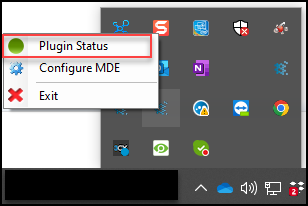
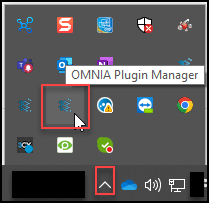
Right click the OMNIA Plugin Manager Icon, select Plugin Status
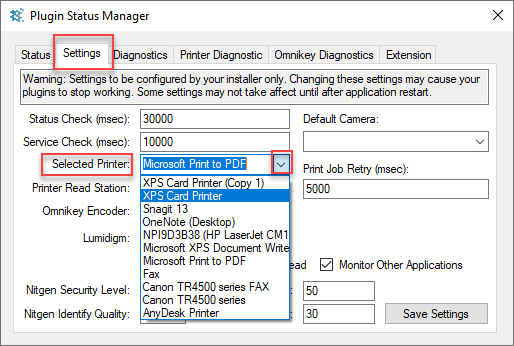
From the Settings Tab, use the dropdown to select your printer click save settings.
Log into the OMNIA URL , if currently logged in, log out then back in.

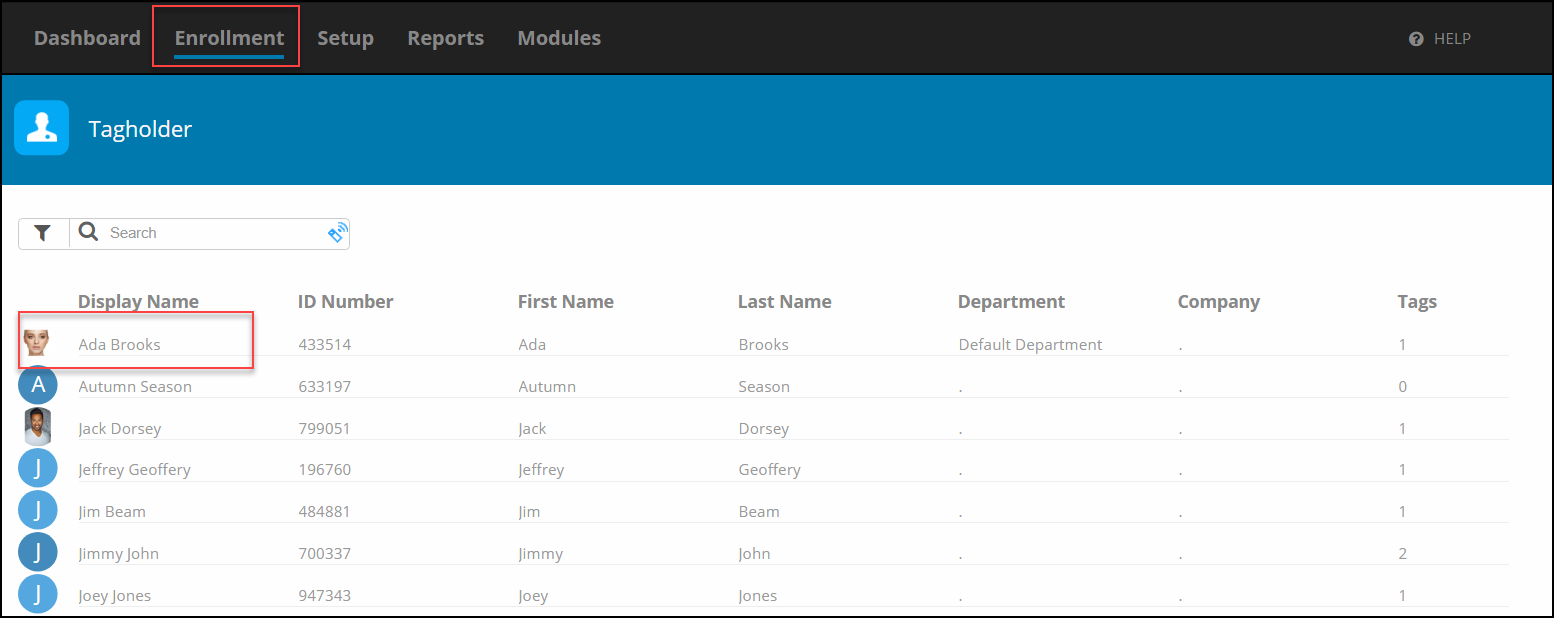
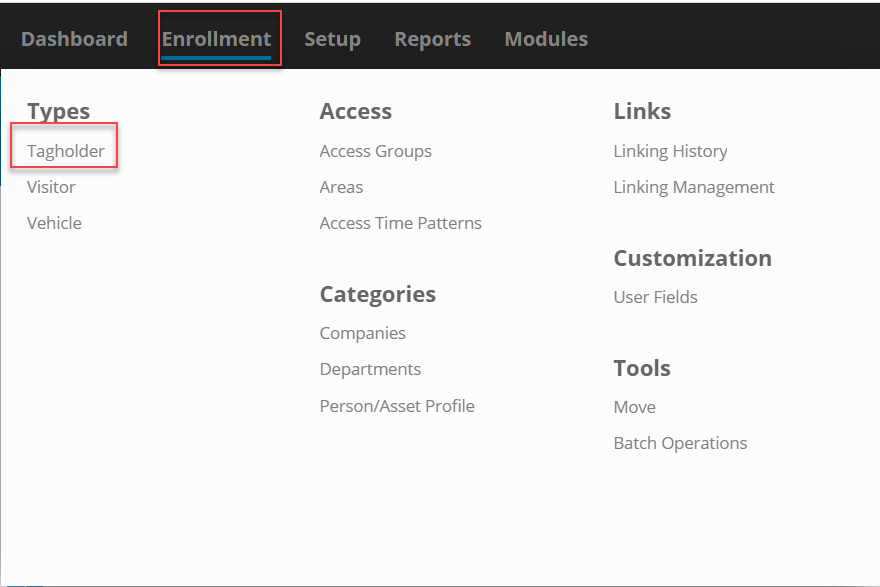
Go to Enrollment\Tagholder and select a Tagholder
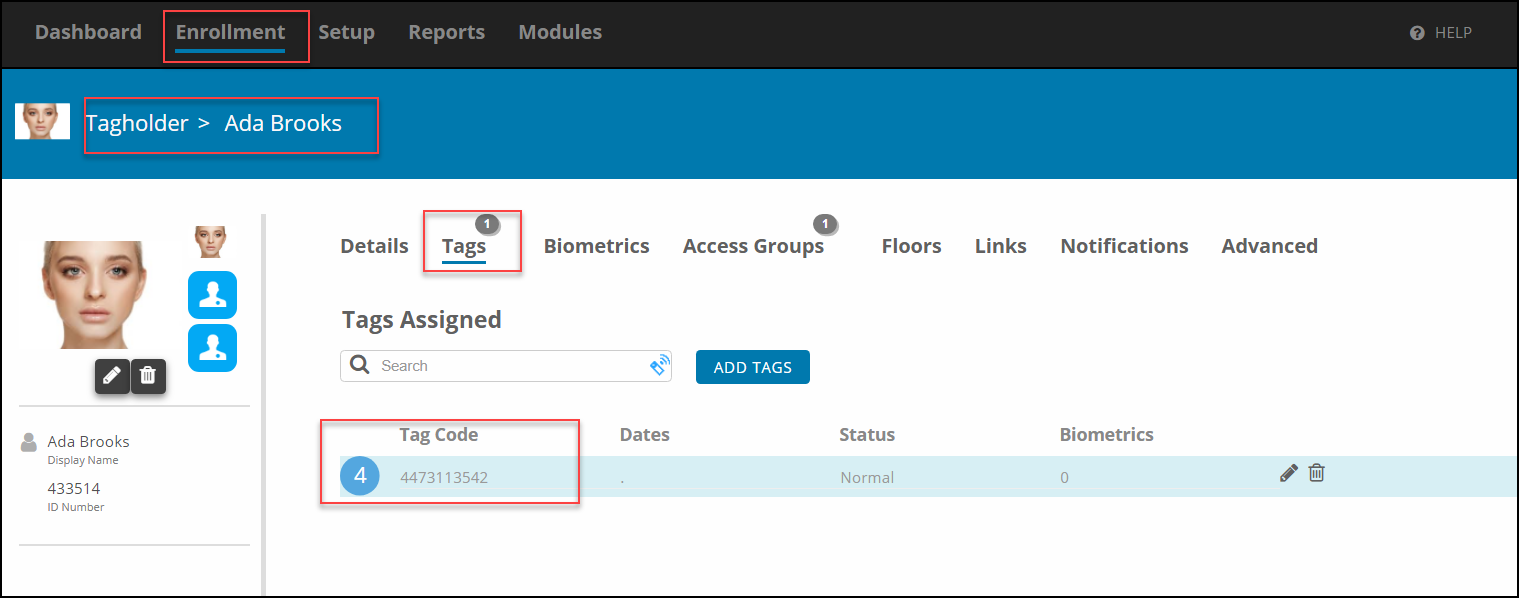
In the Tagholder Screen, Select Tags, then Select the Tag Code
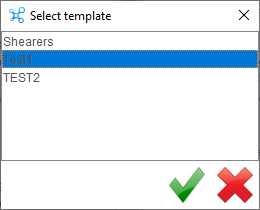
Select Printing, the Print Window will appear. Select your previously designed Card Template by using the arrow and selecting the desired template
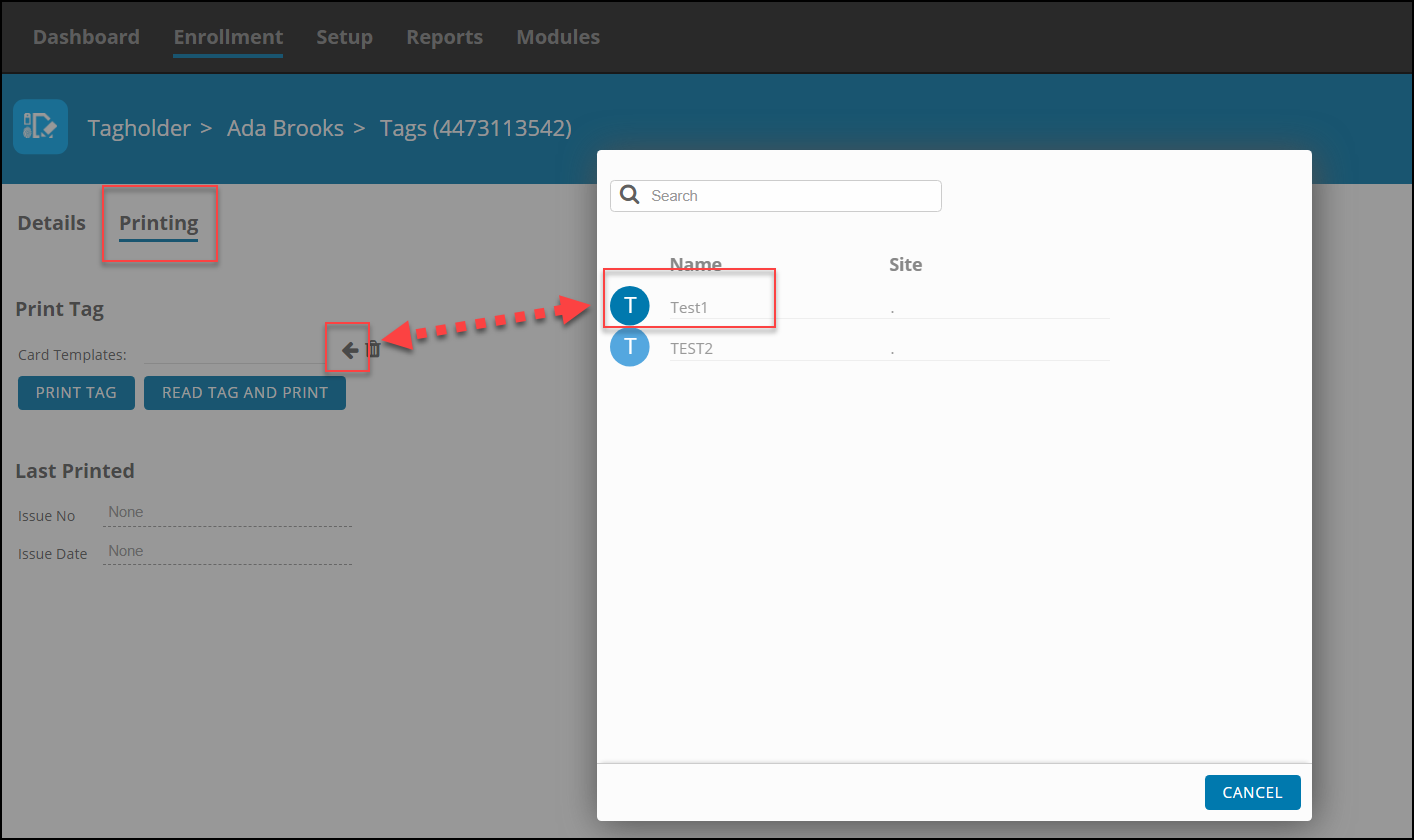
After Selecting the Template, Select Print
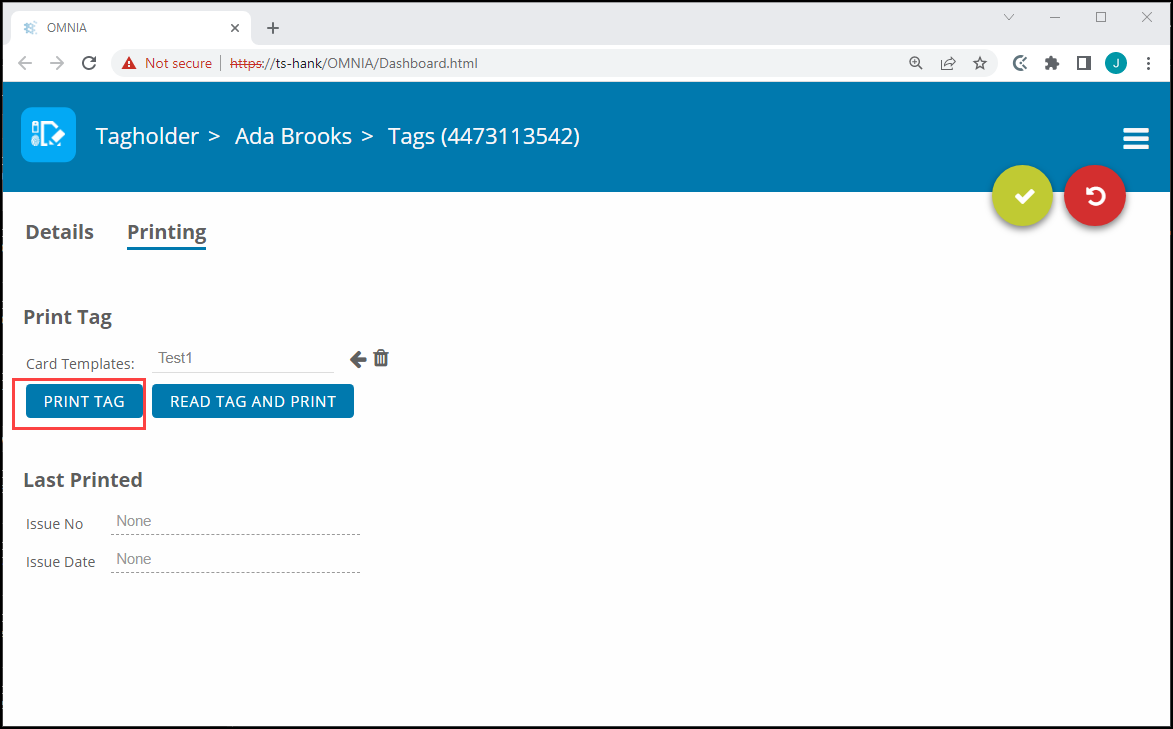
The print job will be sent to the Print Queue.

After the OMNIA Plugin Mgr has been installed, you may have to update the Printer Persistence.xml file.

          Update the Printer Persistence.xml file located at:

          C:\Program Files (x86)\OMNIA\OMNIA Plugin Manager\print\META-INF.
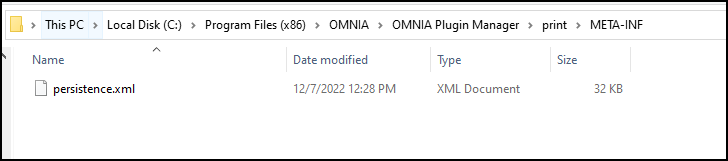
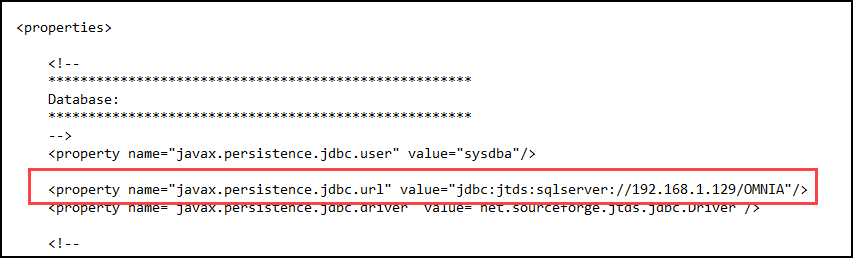
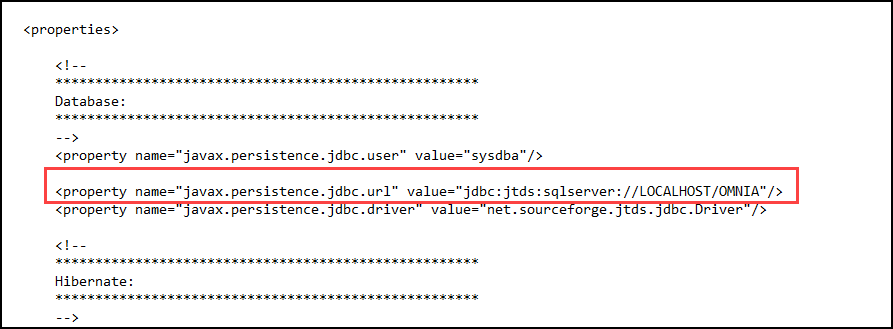
Open the file in Notepad to edit the path and the name of the Database.

Use the IP address of the Database or localhost if the Database resides on the PC you are wanting to print tags from.

Change the Database Name from Portal to OMNIA

NOTE: There are two (2) Locations on the Printing Persistence File that need to be updated.

Using IP of SQL Server
Using LOCALHOST
    Need further assistance?
    Submit a Support Ticket

    Submit a Support Ticket

    FAQ

    General

    Can I initiate RS485 comms to a terminal from an existing IP terminal?

    How to Select the Right Cable for the job

    IDEMIA Sigma Lite Readers NOT compatible for use in AmanoNet or Nexus220

    Network Configuration – Best Practices

    Technical Bulletins

    Akuvox R20 Wiring Diagram to Wiegand Reader Module (WRM)

    Finding and Adding Sigma Biometric Units to OMNIA 4.6.5

    How to add a PAC Tag type to a Tag Holder

    How to upgrade OMNIA hardware firmware using the OMNIA Firmware Upgrade Tool

    OMNIA CSV Imports 

    OMNIA Run as a Service fix for v4.x

    Setting the IP address of a PMT Security Device by Directly Connecting To It with a Laptop.

    Upgrading To OMNIA 4.6.5 and 2019 SQL Express With Tools

    Access Control

    AmanoNet

    AmanoNet Back up using IB Console

    AmanoNet Minimum PC Requirements and Specifications

    AmanoNet System Migration Notes

    Archive Tagholders in AmanoNet

    Archive Transactions in AmanoNet

    AutoID IP Hardware in AmanoNet

    How to get PMTSecurity a copy of the AmanoNet Access Control Database

    How to move AmanoNet Access Control System from one PC to another (Firebird)

    IDEMIA Sigma Lite Readers NOT compatible for use in AmanoNet or Nexus220

    ImproNet/AmanoNet Database Backup: SQL

    Nexxus220

    Change Default Password in Nexus220
    Database Migration from Nexus220/IXP220 to OMNIA
    How to fix a Java SE Binary Error in Nexus220 Software
    How to get a copy of a database from Nexus220 Software
    How to move Nexus220 to a different PC
    IDEMIA Sigma Lite Readers NOT compatible for use in AmanoNet or Nexus220
    Move Nexus220 Access Control System from one PC to another (Firebird)
    Nexus220 Firmware Upgrade
    Nexus220 Notifications Configuration/Email Configuration
    Nexus220 The number of doors for this license has been exceeded
    Nexus220 Web Reports Using Microsoft Edge
    Reduce length of time on buzzer for readers in Nexus220

    Omnia

    Adding a New Department in Omnia

    Adding Companies to Omnia

    Adding Widgets to the OMNIA Dashboard

    Aperio Wireless Lock Integration

    Basic Setup Guide:  Akuvox

    Basic Trouble Shooting OMNIA

    Batch Operations OMNIA

    Change SYSDBA Password in OMNIA

    Changing the IP Address of a Previously Installed Controller using the Omnia Software/URL

    Configuring Web Session Timeouts in OMINA

    Omnia Lite

    Convert a Nexus Lite Database into OMNIA Lite Database

    OMNIA LiTE Backup

    PM Tronics Hardware

    Amano Readers and Credentials

    Change Modulation mode on XQT904 Quad Transmitter
    How do I change Wiegand Output Mode on Amano readers?

    Legacy Hardware

    Factory Reset legacy Amano IP Cameras (sold prior to 2018)

    Factory Reset Nexus220 controller

    How do I factory reset the EC2 (400i) controller?

    Setting IP on PMTronics Inc. Access Control Hardware

    Partner Products

    Partner Products

    IDEMIA Sigma Lite Readers NOT compatible for use in AmanoNet or Nexus220

    Installing Cathexis Carbon and Adding a new Account

    Setting Read Range on a Conekt Reader

    STID Configuration

    Video Management Systems

    Cathexis Video (Amano Vision)

    Adding Cameras into Cathexis

    Cathexis Video AV (AntiVirus Exceptions)

    Installing Cathexis Carbon and Adding a new Account

    Quick Start Guide for Cathexis Vision Version 2025

    AmanoDVMS

    Which AmanoDVMS ports need to be open on my firewall?

    Vision

    Adding Cameras into Cathexis

    AmanoVision web access user name case sensitivity usage

    Updating OMNIA Printer Persistence File

    Updating OMNIA Printer Persistence File

    If the Card Designer Program does not connect to the OMNIA Database.

    After the OMNIA Plugin Mgr has been installed, you may have to update the Printer Persistence.xml file. er the OMNIA Plugin Mgr has been installed, you may have to update the Printer Persistence.xml file.

              Update the Printer Persistence.xml file located at:

              C:\Program Files (x86)\OMNIA\OMNIA Plugin Manager\print\META-INF.

    Open the file in Notepad to edit the path and the name of the Database.

    Use the IP address of the Database or localhost if the Database resides on the PC you are wanting to print tags from.

    Change the Database Name from Portal to OMNIA

    NOTE: There are two (2) Locations on the Printing Persistence File that need to be updated.

    Using IP of SQL Server

    Using LOCALHOST

    Need further assistance?
    Submit a Support Ticket

    Submit a Support Ticket

    FAQ

    General

    Can I initiate RS485 comms to a terminal from an existing IP terminal?

    How to Select the Right Cable for the job

    IDEMIA Sigma Lite Readers NOT compatible for use in AmanoNet or Nexus220

    Network Configuration – Best Practices

    Technical Bulletins

    Akuvox R20 Wiring Diagram to Wiegand Reader Module (WRM)

    Finding and Adding Sigma Biometric Units to OMNIA 4.6.5

    How to add a PAC Tag type to a Tag Holder

    How to upgrade OMNIA hardware firmware using the OMNIA Firmware Upgrade Tool

    OMNIA CSV Imports 

    OMNIA Run as a Service fix for v4.x

    Setting the IP address of a PMT Security Device by Directly Connecting To It with a Laptop.

    Upgrading To OMNIA 4.6.5 and 2019 SQL Express With Tools

    Access Control

    AmanoNet

    AmanoNet Back up using IB Console

    AmanoNet Minimum PC Requirements and Specifications

    AmanoNet System Migration Notes

    Archive Tagholders in AmanoNet

    Archive Transactions in AmanoNet

    AutoID IP Hardware in AmanoNet

    How to get PMTSecurity a copy of the AmanoNet Access Control Database

    How to move AmanoNet Access Control System from one PC to another (Firebird)

    IDEMIA Sigma Lite Readers NOT compatible for use in AmanoNet or Nexus220

    ImproNet/AmanoNet Database Backup: SQL

    Nexxus220

    Change Default Password in Nexus220
    Database Migration from Nexus220/IXP220 to OMNIA
    How to fix a Java SE Binary Error in Nexus220 Software
    How to get a copy of a database from Nexus220 Software
    How to move Nexus220 to a different PC
    IDEMIA Sigma Lite Readers NOT compatible for use in AmanoNet or Nexus220
    Move Nexus220 Access Control System from one PC to another (Firebird)
    Nexus220 Firmware Upgrade
    Nexus220 Notifications Configuration/Email Configuration
    Nexus220 The number of doors for this license has been exceeded
    Nexus220 Web Reports Using Microsoft Edge
    Reduce length of time on buzzer for readers in Nexus220

    Omnia

    Adding a New Department in Omnia

    Adding Companies to Omnia

    Adding Widgets to the OMNIA Dashboard

    Aperio Wireless Lock Integration

    Basic Setup Guide:  Akuvox

    Basic Trouble Shooting OMNIA

    Batch Operations OMNIA

    Change SYSDBA Password in OMNIA

    Changing the IP Address of a Previously Installed Controller using the Omnia Software/URL

    Configuring Web Session Timeouts in OMINA

    Omnia Lite

    Convert a Nexus Lite Database into OMNIA Lite Database

    OMNIA LiTE Backup

    PM Tronics Hardware

    Amano Readers and Credentials

    Change Modulation mode on XQT904 Quad Transmitter
    How do I change Wiegand Output Mode on Amano readers?

    Legacy Hardware

    Factory Reset legacy Amano IP Cameras (sold prior to 2018)

    Factory Reset Nexus220 controller

    How do I factory reset the EC2 (400i) controller?

    Setting IP on PMTronics Inc. Access Control Hardware

    Partner Products

    Partner Products

    IDEMIA Sigma Lite Readers NOT compatible for use in AmanoNet or Nexus220

    Installing Cathexis Carbon and Adding a new Account

    Setting Read Range on a Conekt Reader

    STID Configuration

    Video Management Systems

    Cathexis Video (Amano Vision)

    Adding Cameras into Cathexis

    Cathexis Video AV (AntiVirus Exceptions)

    Installing Cathexis Carbon and Adding a new Account

    Quick Start Guide for Cathexis Vision Version 2025

    AmanoDVMS

    Which AmanoDVMS ports need to be open on my firewall?

    Vision

    Adding Cameras into Cathexis

    AmanoVision web access user name case sensitivity usage

    How to Use The OMNIA Card Designer

    How to Use the OMNIA Card Designer

    Card Designer

    OMNIA has a built-in card designer that automates the process of printing personal information on access cards.

    Card designer is an easy to use graphical interface to design different card templates.

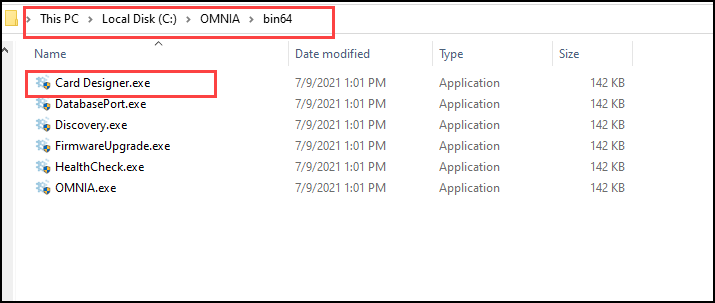
    Find the Card Designer at C:\OMNIA\Bin64\Card Designer.exe

    Run Card Designer as Administrator

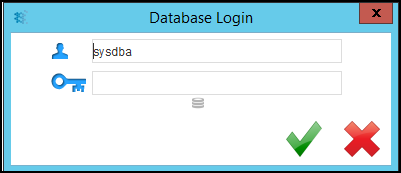
    Card Designer may ask you to log in.

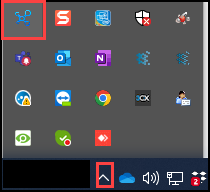
    After launching the Card Designer, The Card Designer Icon will appear in the Task Bar or in the Show Hidden Icons.

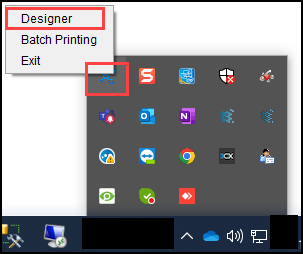
    Right Click the Card Designer Icon and Select Designer

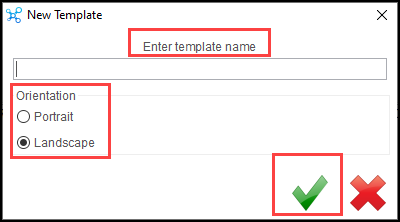
    After Selecting Designer, create a design template by entering a template name, choosing orientation, and selecting save

    If you have already Created Templates, select the template you want to edit.

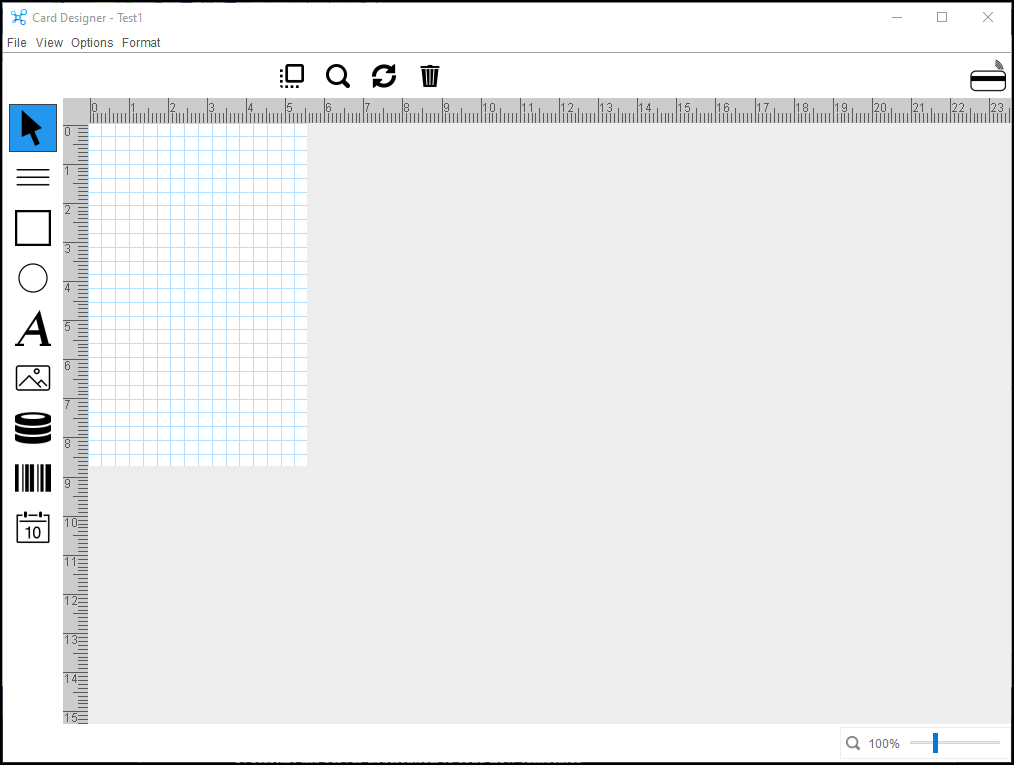
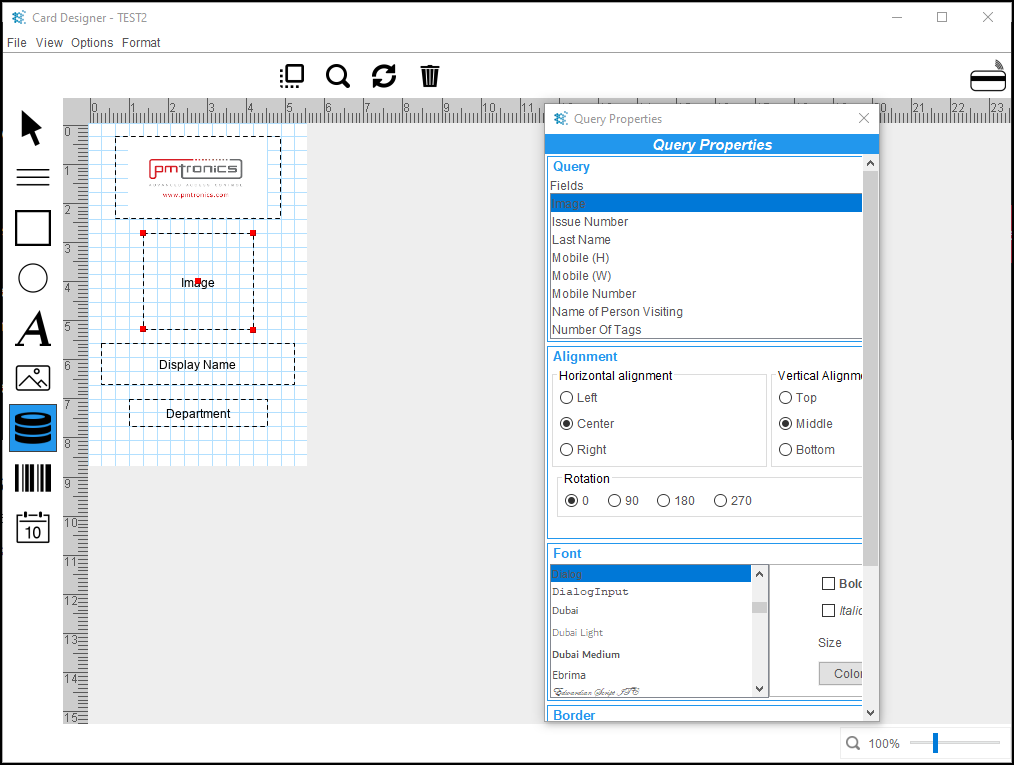
    The template will open in the Card Designer Window, this is where you will create your design template.

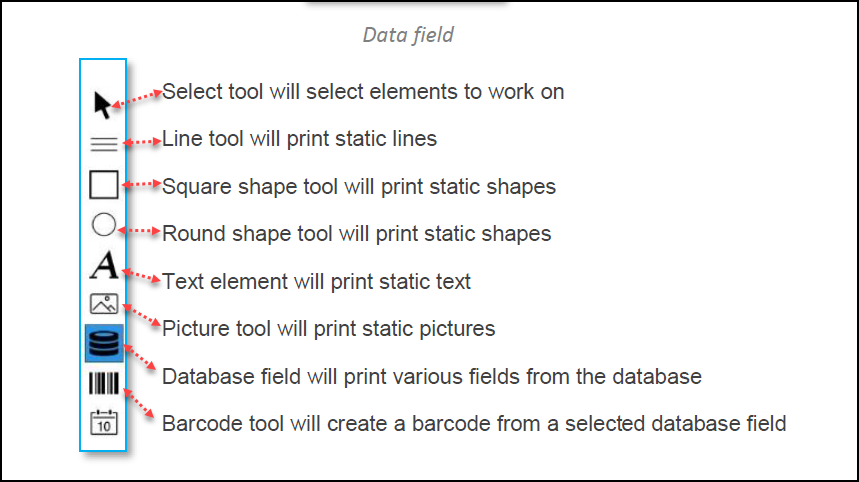
    Data field
    Select tool will select elements to work on
    Line tool will print static lines
    Square shape tool will print static shapes
    Round shape tool will print static shapes
    Text element will print static text
    Picture tool will print static pictures
    Database field will print various fields from the database
    Barcode tool will create a barcode from a selected database field

    The Picture Field will pull information from the PC

    The Database Field will pull information from the OMNIA Database

    Each Field is customizable:

    Alignment: Left, Right, Center, and Horizontal and Vertical

    Rotation: 0, 90, 180, and 270

    Font Type: Bold, Italic, and Size

    Border Position: Horizontal, Vertical

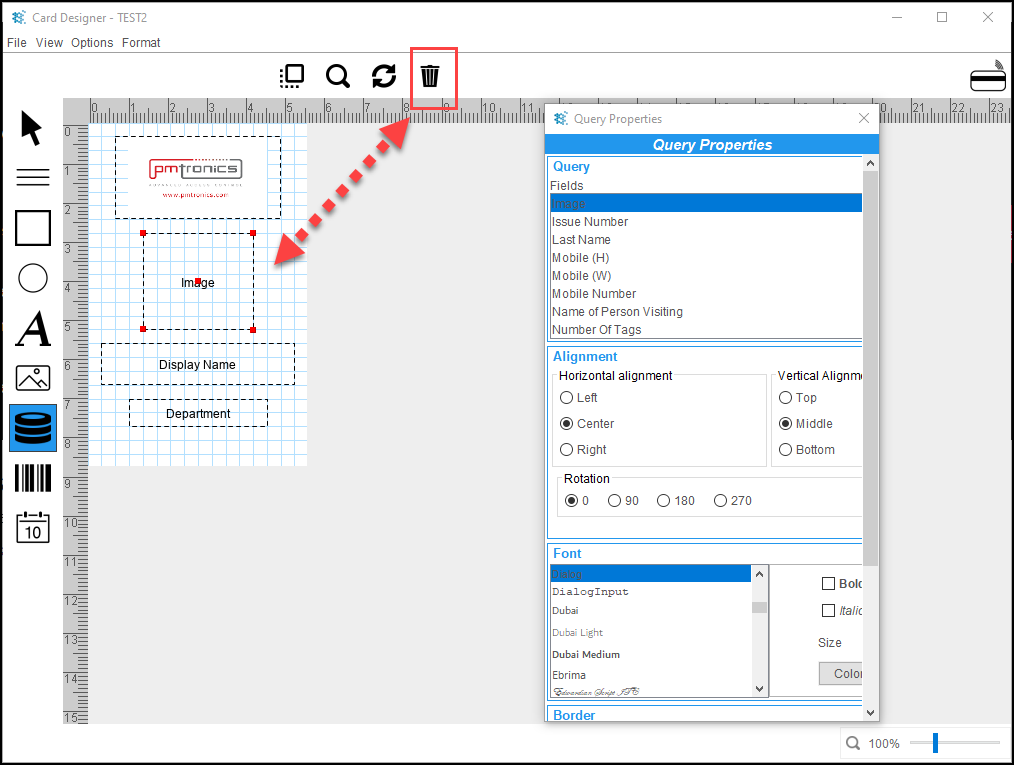
    To delete a field:

    Select it, then select the Trash Can

    There is not a save button, any changes/updates made are saved Automatically, you can close the Card Designer Window


    The Newly Created Template will not be available in the OMNIA URL until you Stop and Exit the OMNIA Server App and Restart it and log back into the OMNIA URL

    We recommend Printing to PDF to verify if you like the positioning of the data fields, this will prevent using up tags/cards and using the printing ribbon. 

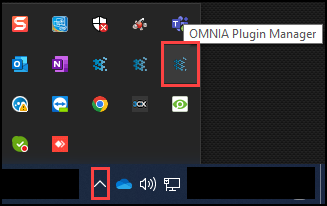
    The printer can be changed in the Plugin Manager. Plugin Manager Icon can be found in Show Hidden Icons in task bar.

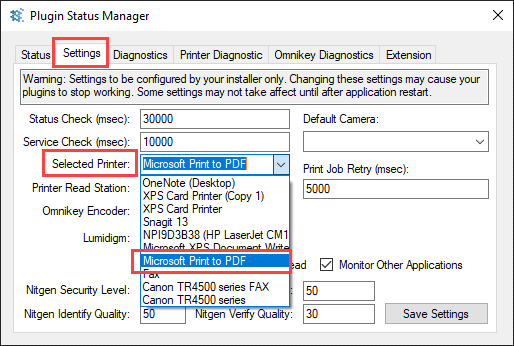
    Select the Settings Tab, then use the Select Printer dropdown to select Print to PDF

    Save the Settings.

      Need further assistance?
      Submit a Support Ticket

      Submit a Support Ticket

      FAQ

      General

      Can I initiate RS485 comms to a terminal from an existing IP terminal?

      How to Select the Right Cable for the job

      IDEMIA Sigma Lite Readers NOT compatible for use in AmanoNet or Nexus220

      Network Configuration – Best Practices

      Technical Bulletins

      Akuvox R20 Wiring Diagram to Wiegand Reader Module (WRM)

      Finding and Adding Sigma Biometric Units to OMNIA 4.6.5

      How to add a PAC Tag type to a Tag Holder

      How to upgrade OMNIA hardware firmware using the OMNIA Firmware Upgrade Tool

      OMNIA CSV Imports 

      OMNIA Run as a Service fix for v4.x

      Setting the IP address of a PMT Security Device by Directly Connecting To It with a Laptop.

      Upgrading To OMNIA 4.6.5 and 2019 SQL Express With Tools

      Access Control

      AmanoNet

      AmanoNet Back up using IB Console

      AmanoNet Minimum PC Requirements and Specifications

      AmanoNet System Migration Notes

      Archive Tagholders in AmanoNet

      Archive Transactions in AmanoNet

      AutoID IP Hardware in AmanoNet

      How to get PMTSecurity a copy of the AmanoNet Access Control Database

      How to move AmanoNet Access Control System from one PC to another (Firebird)

      IDEMIA Sigma Lite Readers NOT compatible for use in AmanoNet or Nexus220

      ImproNet/AmanoNet Database Backup: SQL

      Nexxus220

      Change Default Password in Nexus220
      Database Migration from Nexus220/IXP220 to OMNIA
      How to fix a Java SE Binary Error in Nexus220 Software
      How to get a copy of a database from Nexus220 Software
      How to move Nexus220 to a different PC
      IDEMIA Sigma Lite Readers NOT compatible for use in AmanoNet or Nexus220
      Move Nexus220 Access Control System from one PC to another (Firebird)
      Nexus220 Firmware Upgrade
      Nexus220 Notifications Configuration/Email Configuration
      Nexus220 The number of doors for this license has been exceeded
      Nexus220 Web Reports Using Microsoft Edge
      Reduce length of time on buzzer for readers in Nexus220

      Omnia

      Adding a New Department in Omnia

      Adding Companies to Omnia

      Adding Widgets to the OMNIA Dashboard

      Aperio Wireless Lock Integration

      Basic Setup Guide:  Akuvox

      Basic Trouble Shooting OMNIA

      Batch Operations OMNIA

      Change SYSDBA Password in OMNIA

      Changing the IP Address of a Previously Installed Controller using the Omnia Software/URL

      Configuring Web Session Timeouts in OMINA

      Omnia Lite

      Convert a Nexus Lite Database into OMNIA Lite Database

      OMNIA LiTE Backup

      PM Tronics Hardware

      Amano Readers and Credentials

      Change Modulation mode on XQT904 Quad Transmitter
      How do I change Wiegand Output Mode on Amano readers?

      Legacy Hardware

      Factory Reset legacy Amano IP Cameras (sold prior to 2018)

      Factory Reset Nexus220 controller

      How do I factory reset the EC2 (400i) controller?

      Setting IP on PMTronics Inc. Access Control Hardware

      Partner Products

      Partner Products

      IDEMIA Sigma Lite Readers NOT compatible for use in AmanoNet or Nexus220

      Installing Cathexis Carbon and Adding a new Account

      Setting Read Range on a Conekt Reader

      STID Configuration

      Video Management Systems

      Cathexis Video (Amano Vision)

      Adding Cameras into Cathexis

      Cathexis Video AV (AntiVirus Exceptions)

      Installing Cathexis Carbon and Adding a new Account

      Quick Start Guide for Cathexis Vision Version 2025

      AmanoDVMS

      Which AmanoDVMS ports need to be open on my firewall?

      Vision

      Adding Cameras into Cathexis

      AmanoVision web access user name case sensitivity usage

      ImproNet/AmanoNet Database Backup: SQL

      ImproNet/AmanoNet Database Backup: SQL

      How to make an ImproNet/AmanoNet SQL Database Backup

      It is essential that regular backups are made and kept on removable media, or on a networked drive.

      Storing backups on the local disk will not prevent data loss if the hard drive fails.

      To Backup your ImproNet/AmanoNet SQL Database:

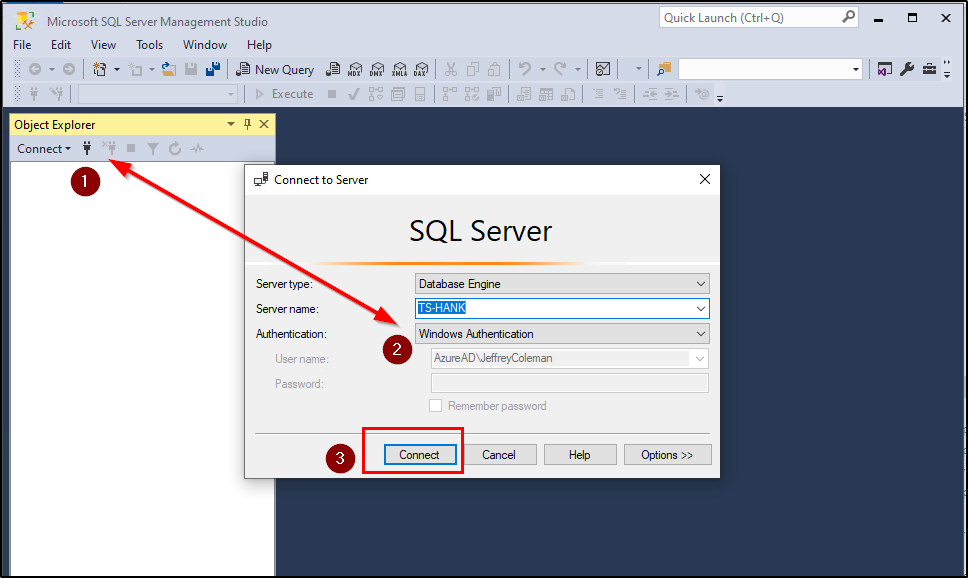
      • Open Sql Server Management Studio
      • Login using your Login Details

      Windows Authentication should be sufficient unless the site has no allowed Windows Authentication
                  Defaults: (Username: Sysdba, Password: masterkey). (Username: sa, Password:                                                    M@sterkey1)

      • Click on Connect
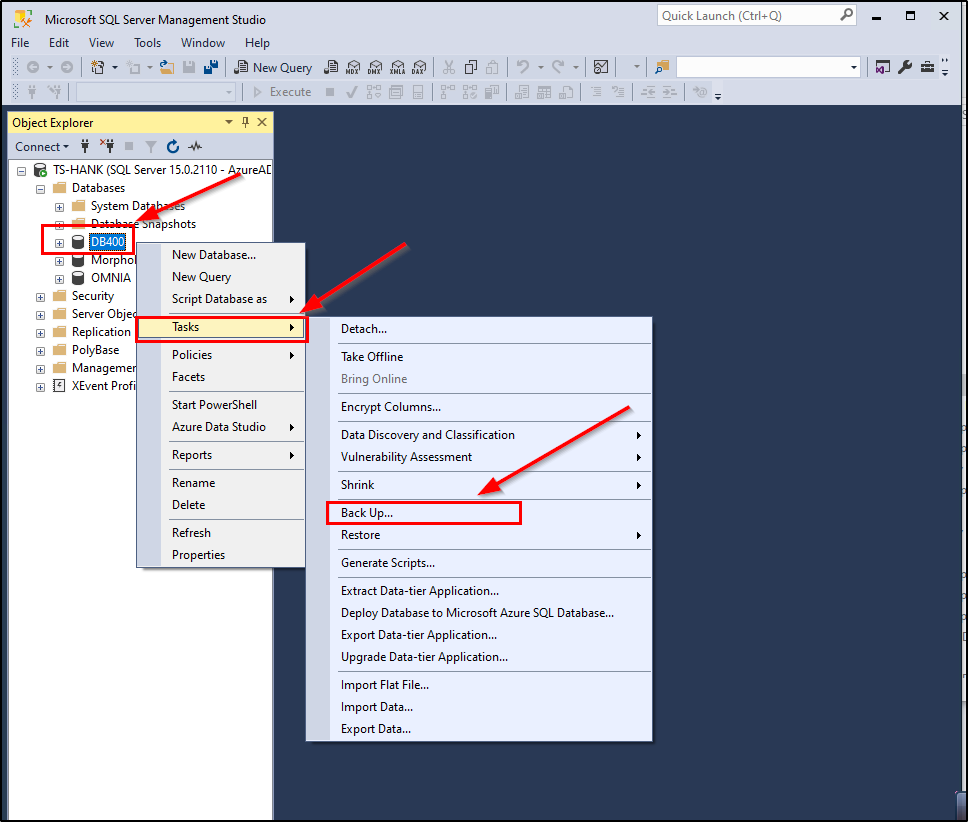
      • Expand the Database Folder by clicking on the + next to Databases
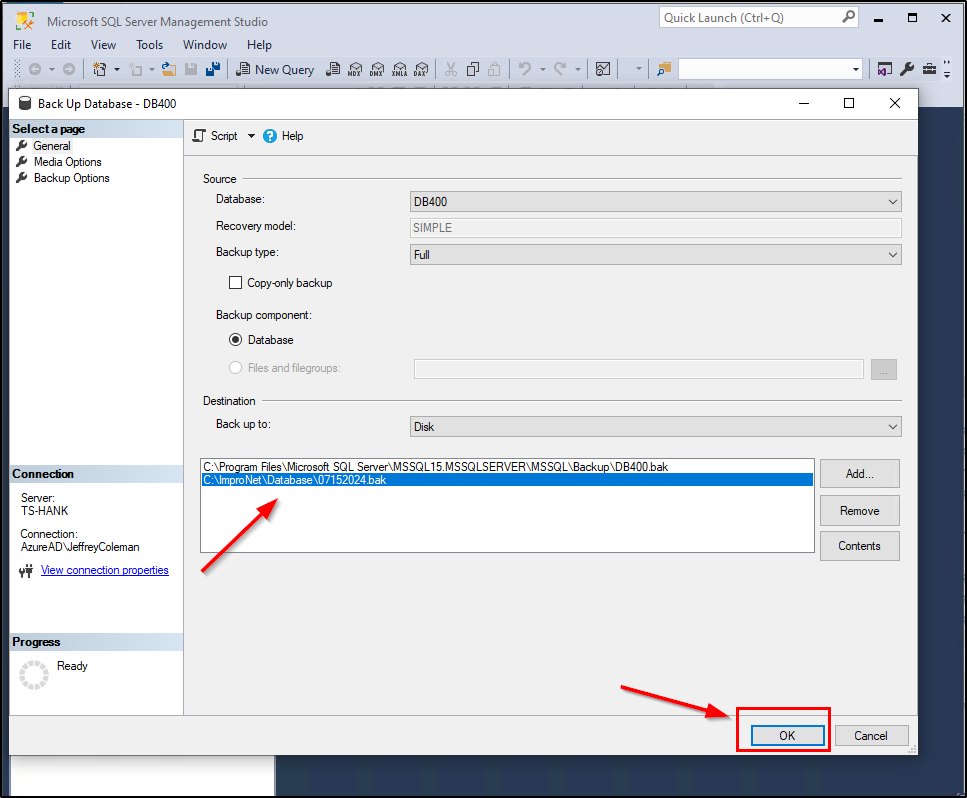
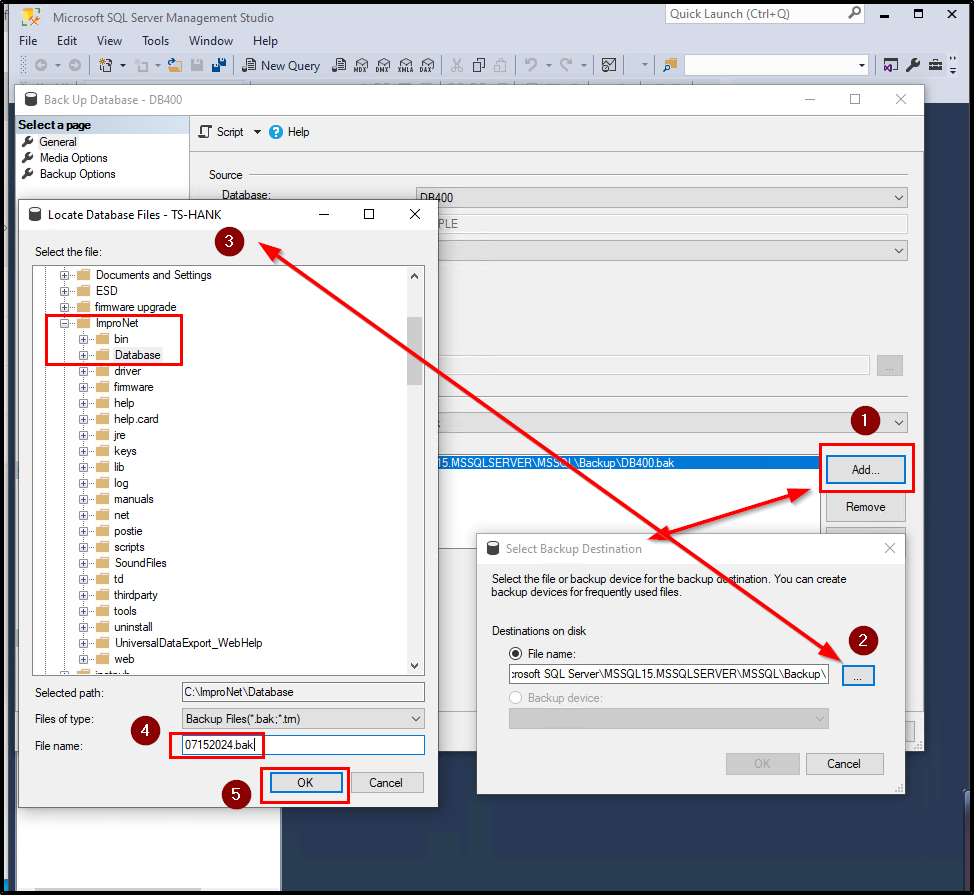
      • Right Click on the ImproNet/AmanoNet SQL Database, The Database name is DB400.                      DB400 > Tasks> Back Up…
      • Click on the Add… Button
      • Click on the … Button and Navigate to the following location: [Drive:] \ImproNet\database\Backups OR The location you want to store backups to
      • Enter a name for your backup with a suffix off: .Bak
      • Click on Ok,
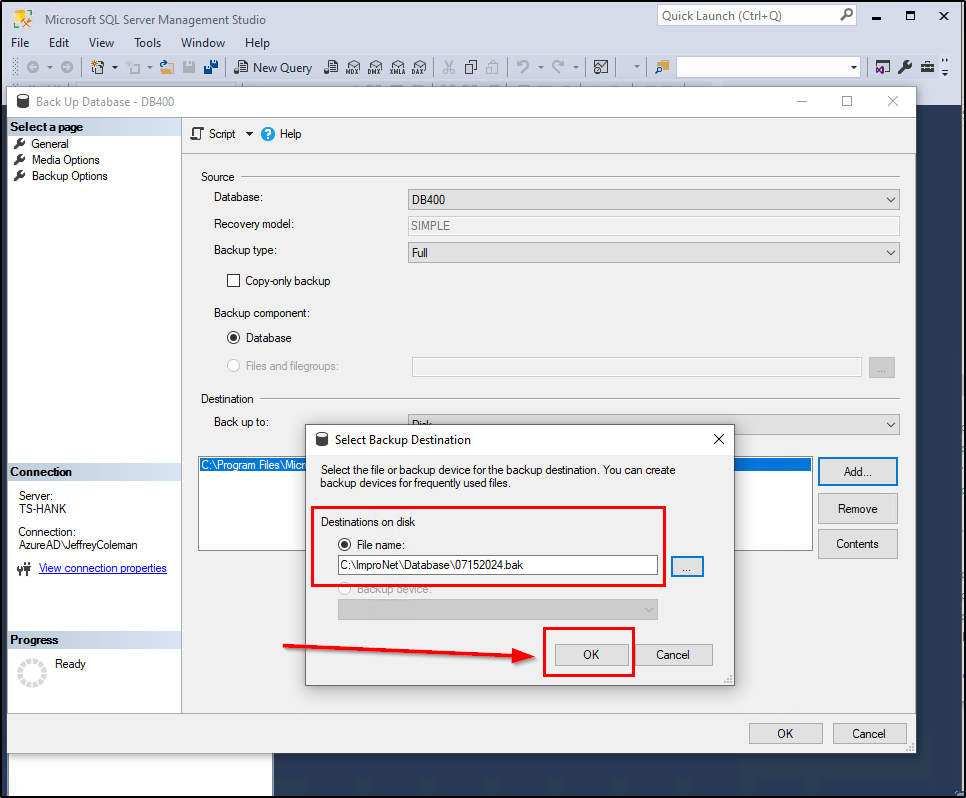
      • Verify the Backup Name and Location. Click on the OK Button on Select Backup Destination Window
      • Select the Correct Path from above then Select OK.
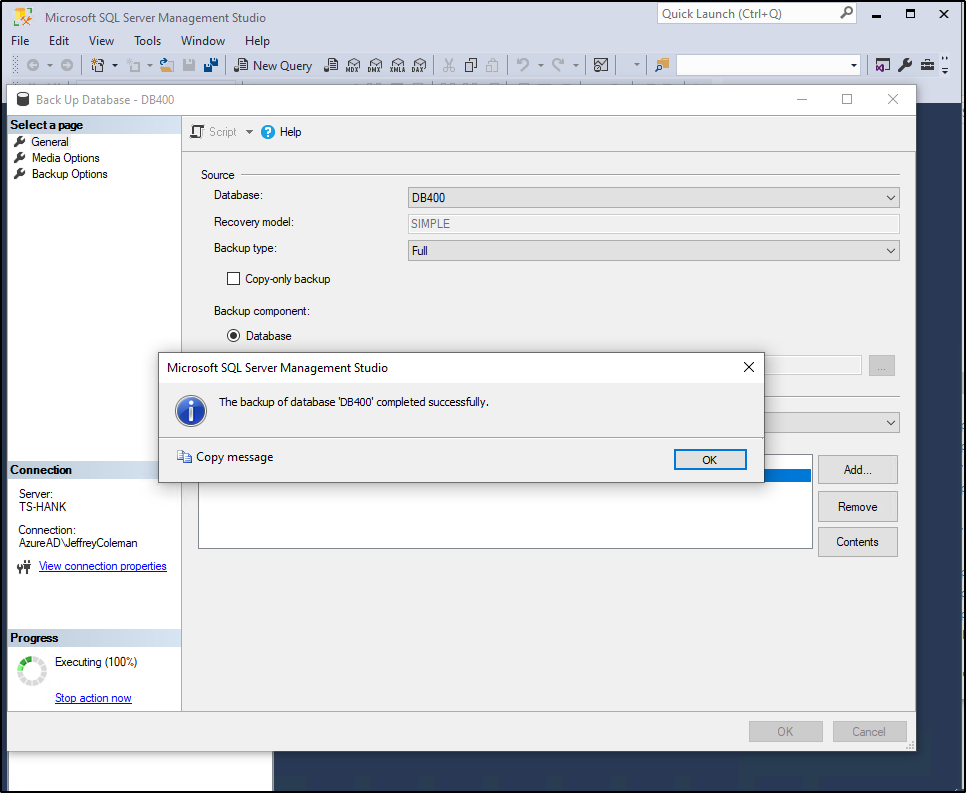
      • The Backup will begin.
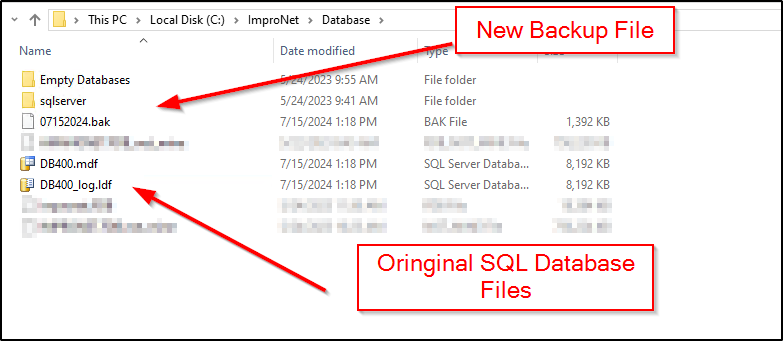
      • The backup is now complete and at the location you selected in a previous step.

      Need further assistance?
      Submit a Support Ticket

      Submit a Support Ticket

      FAQ

      General

      Can I initiate RS485 comms to a terminal from an existing IP terminal?

      How to Select the Right Cable for the job

      IDEMIA Sigma Lite Readers NOT compatible for use in AmanoNet or Nexus220

      Network Configuration – Best Practices

      Technical Bulletins

      Akuvox R20 Wiring Diagram to Wiegand Reader Module (WRM)

      Finding and Adding Sigma Biometric Units to OMNIA 4.6.5

      How to add a PAC Tag type to a Tag Holder

      How to upgrade OMNIA hardware firmware using the OMNIA Firmware Upgrade Tool

      OMNIA CSV Imports 

      OMNIA Run as a Service fix for v4.x

      Setting the IP address of a PMT Security Device by Directly Connecting To It with a Laptop.

      Upgrading To OMNIA 4.6.5 and 2019 SQL Express With Tools

      Access Control

      AmanoNet

      AmanoNet Back up using IB Console

      AmanoNet Minimum PC Requirements and Specifications

      AmanoNet System Migration Notes

      Archive Tagholders in AmanoNet

      Archive Transactions in AmanoNet

      AutoID IP Hardware in AmanoNet

      How to get PMTSecurity a copy of the AmanoNet Access Control Database

      How to move AmanoNet Access Control System from one PC to another (Firebird)

      IDEMIA Sigma Lite Readers NOT compatible for use in AmanoNet or Nexus220

      NOTICE! UPGRADE TO AMANONET 7.74 – EC2/400i NO LONGER AVAILABLE

      Nexxus220

      Change Default Password in Nexus220
      Database Migration from Nexus220/IXP220 to OMNIA
      How to fix a Java SE Binary Error in Nexus220 Software
      How to get a copy of a database from Nexus220 Software
      How to move Nexus220 to a different PC
      IDEMIA Sigma Lite Readers NOT compatible for use in AmanoNet or Nexus220
      Move Nexus220 Access Control System from one PC to another (Firebird)
      Nexus220 Firmware Upgrade
      Nexus220 Notifications Configuration/Email Configuration
      Nexus220 The number of doors for this license has been exceeded
      Nexus220 Web Reports Using Microsoft Edge
      Reduce length of time on buzzer for readers in Nexus220

      Omnia

      Adding a New Department in Omnia

      Adding Companies to Omnia

      Adding Widgets to the OMNIA Dashboard

      Aperio Wireless Lock Integration

      Basic Setup Guide:  Akuvox

      Basic Trouble Shooting OMNIA

      Batch Operations OMNIA

      Change SYSDBA Password in OMNIA

      Changing the IP Address of a Previously Installed Controller using the Omnia Software/URL

      Configuring Web Session Timeouts in OMINA

      Omnia Lite

      Convert a Nexus Lite Database into OMNIA Lite Database

      OMNIA LiTE Backup

      PM Tronics Hardware

      Amano Readers and Credentials

      Change Modulation mode on XQT904 Quad Transmitter
      How do I change Wiegand Output Mode on Amano readers?

      Legacy Hardware

      Factory Reset legacy Amano IP Cameras (sold prior to 2018)

      Factory Reset Nexus220 controller

      How do I factory reset the EC2 (400i) controller?

      Setting IP on PMTronics Inc. Access Control Hardware

      Partner Products

      Partner Products

      IDEMIA Sigma Lite Readers NOT compatible for use in AmanoNet or Nexus220

      Installing Cathexis Carbon and Adding a new Account

      Setting Read Range on a Conekt Reader

      STID Configuration

      Video Management Systems

      Cathexis Video (Amano Vision)

      Adding Cameras into Cathexis

      Cathexis Video AV (AntiVirus Exceptions)

      Installing Cathexis Carbon and Adding a new Account

      Quick Start Guide for Cathexis Vision Version 2025

      AmanoDVMS

      Which AmanoDVMS ports need to be open on my firewall?

      Vision

      Adding Cameras into Cathexis

      AmanoVision web access user name case sensitivity usage

      How to Install The OMNIA Plugin Manager

      How to Install The OMNIA Plugin Manager

      OMNIA Plugin Manager will allow the Multi Discipline Enrollment Reader (MDE) to be used to Enroll Tags for Tagholders into OMNIA.

      To install the OMNIA Plugin Manager.

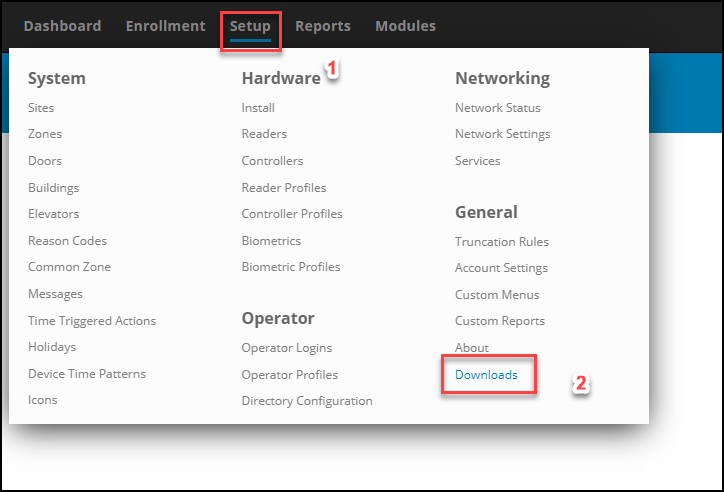
      In the OMNIA URL go to Setup/Downloads

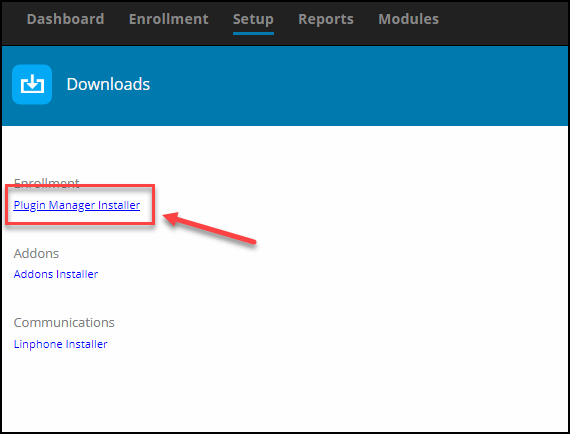
      Select the Plugin Manager Installer

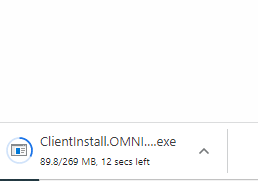
      The Plugin Manager installation files will download

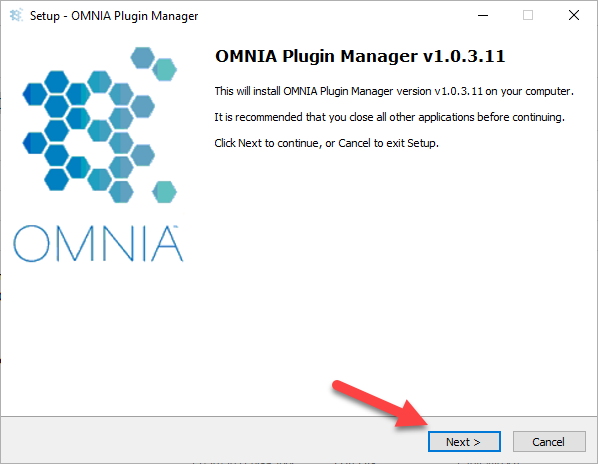
      Once Download Completes, Run the installer as administrator

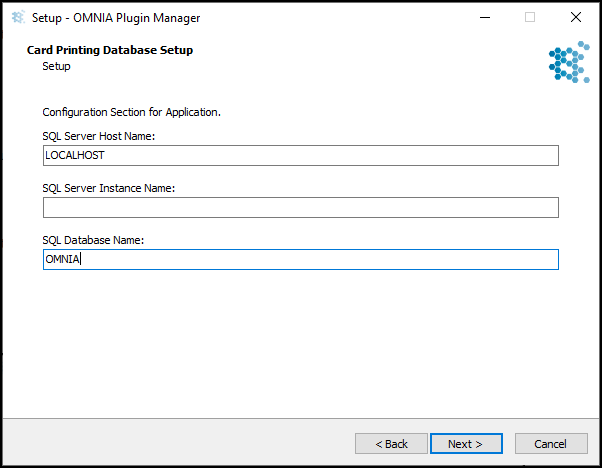
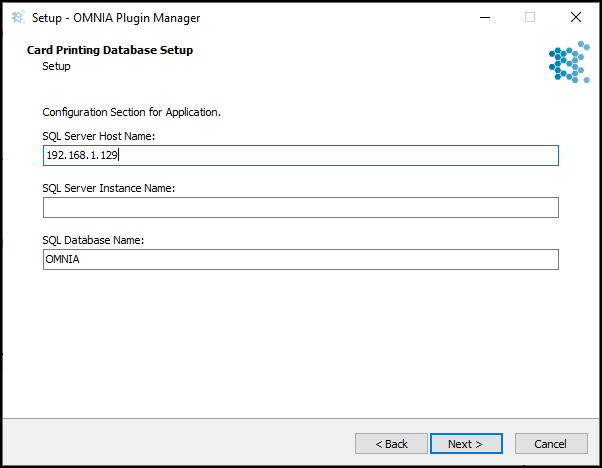
      Enter the SQL Server Host Name, Localhost if SQL server is running on same PC the Plugin Mgr is being installed IP Address where OMNIA Server App is running or PC Name of where OMNIA Server App is running.

      Leave the SQL Server Instance Name Blank:

      Enter SQL Database Name: OMNIA

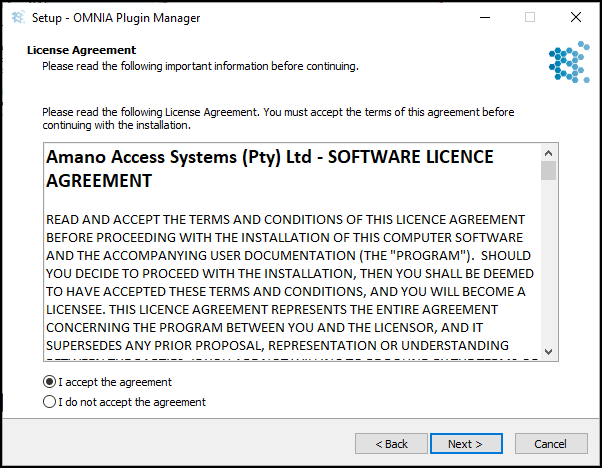
      Accept the License Agreement

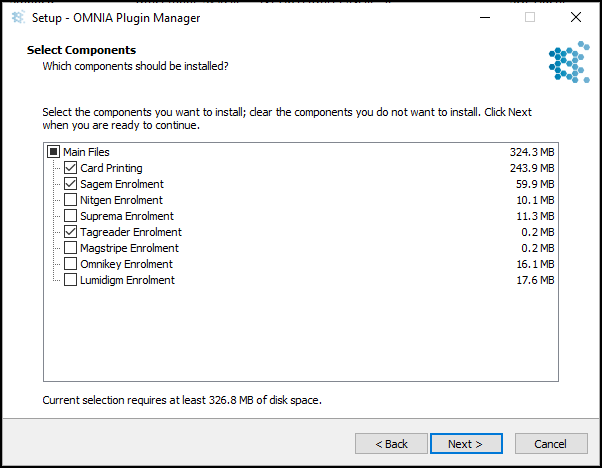
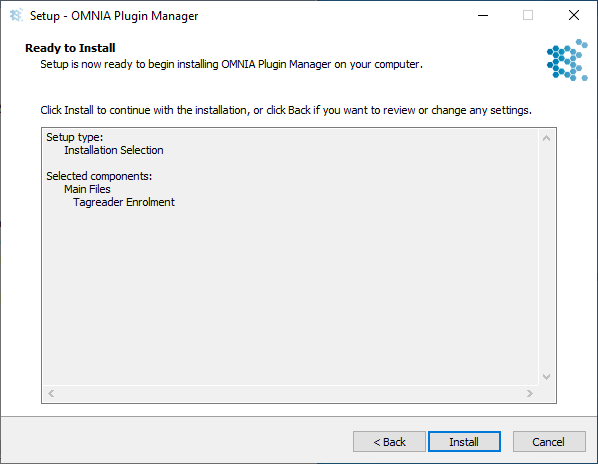
      Select the Components to be installed, Click Next

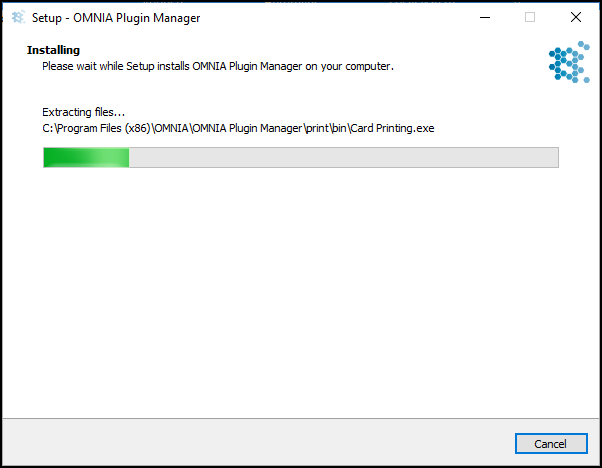
      Click Install

      Installation begins

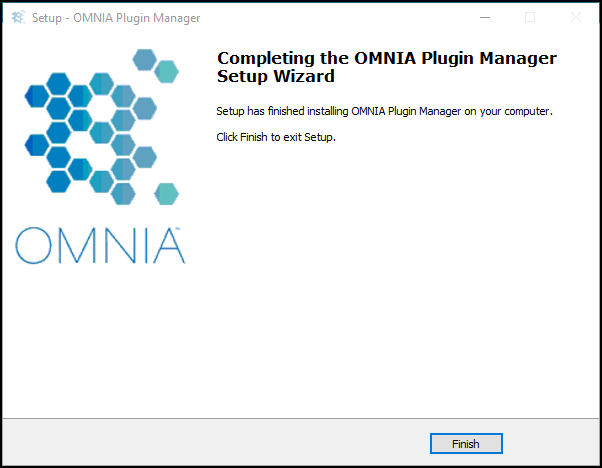
      When Installation Completes, Click Finish

      To Launch the Plugin Manager

      •  Go to C:\ProgramFiles(x86)\OMNIA\OMNIA Plugin Manager\OMNIA Plugin Manager.exe
      •  Run OMNIA Plugin Manager.exe as Administrator

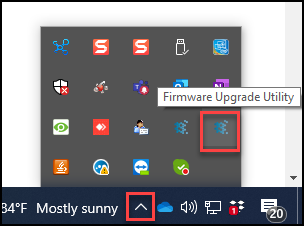
      OMNIA Plugin Manager will appear in task bar under show hidden Icons

      Need further assistance?
      Submit a Support Ticket

      Submit a Support Ticket

      FAQ

      General

      Can I initiate RS485 comms to a terminal from an existing IP terminal?

      How to Select the Right Cable for the job

      IDEMIA Sigma Lite Readers NOT compatible for use in AmanoNet or Nexus220

      Network Configuration – Best Practices

      Technical Bulletins

      Akuvox R20 Wiring Diagram to Wiegand Reader Module (WRM)

      Finding and Adding Sigma Biometric Units to OMNIA 4.6.5

      How to add a PAC Tag type to a Tag Holder

      How to upgrade OMNIA hardware firmware using the OMNIA Firmware Upgrade Tool

      OMNIA CSV Imports 

      OMNIA Run as a Service fix for v4.x

      Setting the IP address of a PMT Security Device by Directly Connecting To It with a Laptop.

      Upgrading To OMNIA 4.6.5 and 2019 SQL Express With Tools

      Access Control

      AmanoNet

      AmanoNet Back up using IB Console

      AmanoNet Minimum PC Requirements and Specifications

      AmanoNet System Migration Notes

      Archive Tagholders in AmanoNet

      Archive Transactions in AmanoNet

      AutoID IP Hardware in AmanoNet

      How to get PMTSecurity a copy of the AmanoNet Access Control Database

      How to move AmanoNet Access Control System from one PC to another (Firebird)

      IDEMIA Sigma Lite Readers NOT compatible for use in AmanoNet or Nexus220

      ImproNet/AmanoNet Database Backup: SQL

      Nexxus220

      Change Default Password in Nexus220
      Database Migration from Nexus220/IXP220 to OMNIA
      How to fix a Java SE Binary Error in Nexus220 Software
      How to get a copy of a database from Nexus220 Software
      How to move Nexus220 to a different PC
      IDEMIA Sigma Lite Readers NOT compatible for use in AmanoNet or Nexus220
      Move Nexus220 Access Control System from one PC to another (Firebird)
      Nexus220 Firmware Upgrade
      Nexus220 Notifications Configuration/Email Configuration
      Nexus220 The number of doors for this license has been exceeded
      Nexus220 Web Reports Using Microsoft Edge
      Reduce length of time on buzzer for readers in Nexus220

      Omnia

      Adding a New Department in Omnia

      Adding Companies to Omnia

      Adding Widgets to the OMNIA Dashboard

      Aperio Wireless Lock Integration

      Basic Setup Guide:  Akuvox

      Basic Trouble Shooting OMNIA

      Batch Operations OMNIA

      Change SYSDBA Password in OMNIA

      Changing the IP Address of a Previously Installed Controller using the Omnia Software/URL

      Configuring Web Session Timeouts in OMINA

      Omnia Lite

      Convert a Nexus Lite Database into OMNIA Lite Database

      OMNIA LiTE Backup

      PM Tronics Hardware

      Amano Readers and Credentials

      Change Modulation mode on XQT904 Quad Transmitter
      How do I change Wiegand Output Mode on Amano readers?

      Legacy Hardware

      Factory Reset legacy Amano IP Cameras (sold prior to 2018)

      Factory Reset Nexus220 controller

      How do I factory reset the EC2 (400i) controller?

      Setting IP on PMTronics Inc. Access Control Hardware

      Partner Products

      Partner Products

      IDEMIA Sigma Lite Readers NOT compatible for use in AmanoNet or Nexus220

      Installing Cathexis Carbon and Adding a new Account

      Setting Read Range on a Conekt Reader

      STID Configuration

      Video Management Systems

      Cathexis Video (Amano Vision)

      Adding Cameras into Cathexis

      Cathexis Video AV (AntiVirus Exceptions)

      Installing Cathexis Carbon and Adding a new Account

      Quick Start Guide for Cathexis Vision Version 2025

      AmanoDVMS

      Which AmanoDVMS ports need to be open on my firewall?

      Vision

      Adding Cameras into Cathexis

      AmanoVision web access user name case sensitivity usage

      • « Go to Previous Page
      • Page 1
      • Interim pages omitted …
      • Page 6
      • Page 7
      • Page 8
      • Page 9
      • Page 10
      • Interim pages omitted …
      • Page 18
      • Go to Next Page »

      PMT Security

      Copyright © 2025 PMT Security, Inc. | All Rights Reserved